
Best visual storytelling tools: which workflow fits your story?
The best visual storytelling tool is the one whose starting workflow matches the work you need to produce.
Drawify, Canva, Napkin AI, Gamma and Miro can all support visual communication, but they begin from different places.
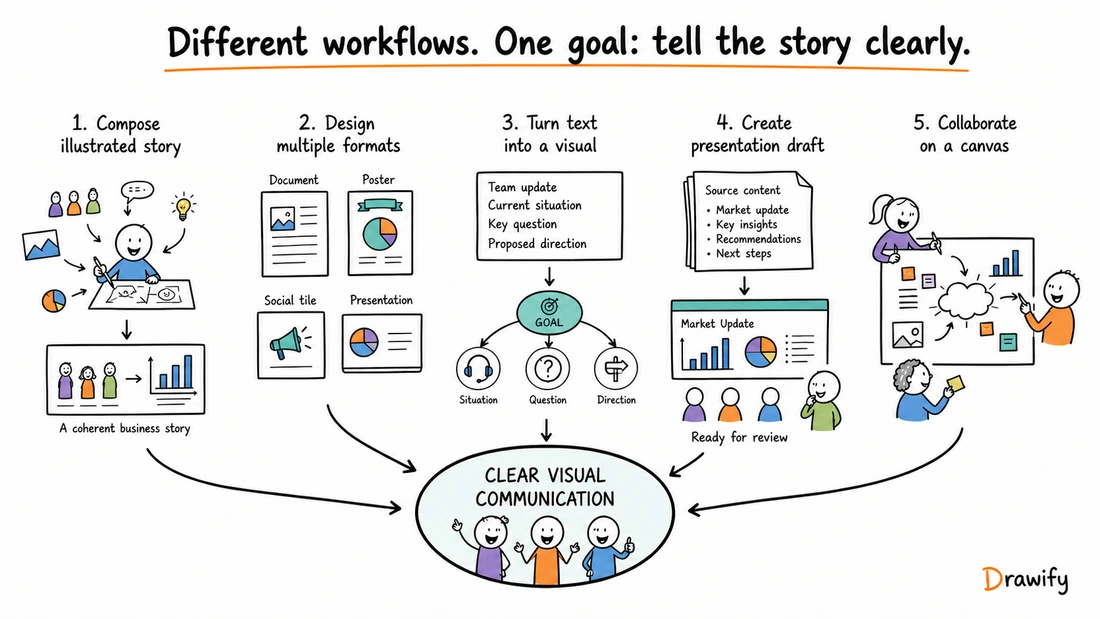
From reading to creating
Try one clear brand story before choosing your tool
Need to explain what your business stands for? Start with a message house: one promise, three supporting ideas and evidence underneath.

Worked example: a neighbourhood repair café
- Promise
- Keep useful things in use.
- Supporting ideas
- Repair together. Learn practical skills. Waste less.
- Evidence to collect
- Count repaired items, workshop attendance and repeat visits. Add verified figures when available.
Replace the template prompts with your promise and supporting points, then export a visual for your pitch. You do not need a whole presentation to test whether the story is clear.
Try the Brand Message House templatePreview the template, then choose Customise to edit it. Sign-in and your plan’s access rules apply.
Quick comparison
This guide compares the five tools by best fit, core output, collaboration, presentation support and distinguishing feature. One centres on composing hand-drawn business stories from artist-created illustrations. Another spans many design formats. Others generate visuals or presentations from text, or provide a shared canvas for teams to work together.
This is not a universal ranking. Product capabilities, plans and beta status can change, so confirm current product details before making a purchasing decision.
| Tool | Best for | Core output | Collaboration | Presentation support | Distinguishing feature |
|---|---|---|---|---|---|
| Drawify | Hand-drawn visual storytelling and illustrated business communication | Composed visual stories made with artist-created illustrations, text and templates | Use completed visuals in team workflows through exports or Drawify's documented Google Slides and Miro integrations | Google Slides integration plus JPEG, PNG and PDF exports for presentation workflows | Artist-created illustration library combined with visual composition and supported customization |
| Canva | Creating visual communication across multiple formats in one broader design environment | Presentations, documents, whiteboards, social content, video, websites, print and other design formats | Real-time collaboration, comments and task assignment are documented by Canva | Built-in presentation creation and delivery features | A connected visual suite spanning many content and design formats |
| Napkin AI | Turning existing text into editable business visuals such as diagrams, charts and flowcharts | Text-derived visuals; Napkin Slides also provides a presentation workflow and is currently described as beta | Teamspace, real-time co-editing and feedback features are documented by Napkin | Visual exports include PPT, PNG, SVG and PDF; Napkin Slides provides presentation creation and export | Generates selectable visuals from text with element-level editing |
| Gamma | Creating AI-assisted presentations and other structured visual content from existing input | Presentations, documents, webpages and other structured content | Sharing permissions support viewing, commenting and editing, subject to workspace and plan settings | Built-in presentation mode plus PDF, PNG and PowerPoint export | Generates and structures a complete first draft with AI-assisted editing |
| Miro | Collaborative visual work, workshops, mapping and diagramming on a shared canvas | Visual workspace boards containing diagrams, maps, workshop material and connected content | Real-time and asynchronous collaboration within a shared visual workspace | Board content can be organized and delivered using Miro presentation features | A shared extensible canvas designed for collaborative visual work |
How to read this table
“Best for” describes the clearest fit of each product's documented workflow. It does not mean that the tool can only perform that task or that every alternative is unsuitable.
Collaboration also means different things across these products. It may refer to co-editing inside the tool, feedback and access controls, or taking an exported visual into another collaborative destination.
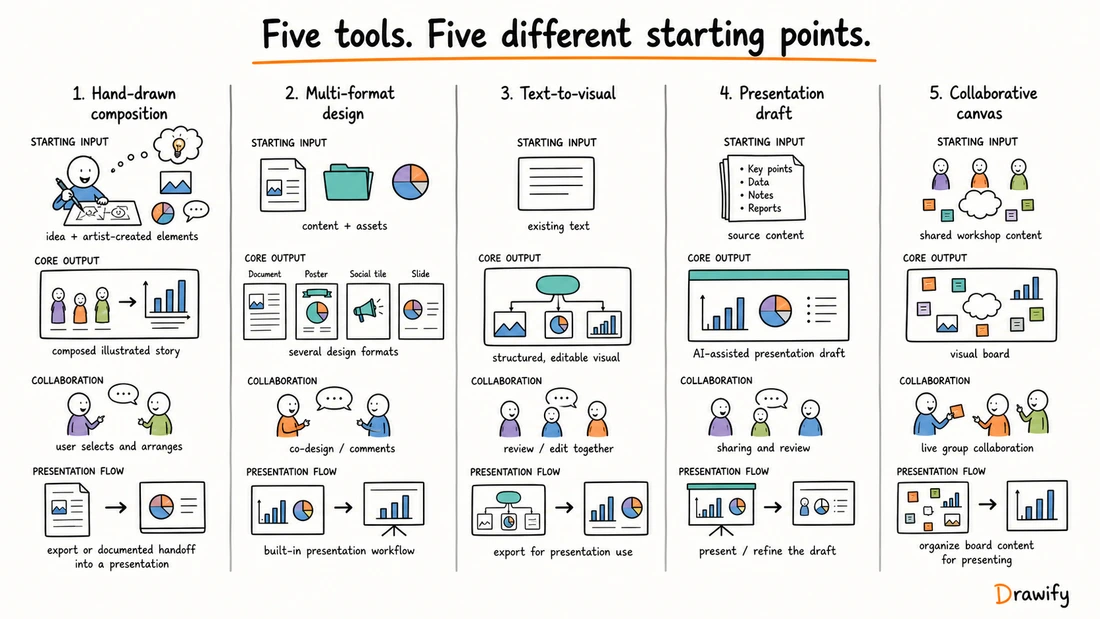
1. Drawify: best for hand-drawn visual storytelling and illustrated business communication
Drawify is a visual-storytelling platform built around an illustration library created by professional artists and visual storytellers.
Start with the message you need to explain, select relevant hand-drawn elements, arrange them into a composition, add text and adapt supported colors or layout.
Templates can provide a starting structure for common communication needs.
What Drawify produces
Drawify is suited to composed visual stories such as:
- A current-state to proposed-future story.
- A business process with roles and handoffs.
- A stakeholder landscape with labelled relationships.
- A workshop journey or outcome summary.
- A customer journey with actions and open questions.
- A strategy visual showing evidence, tension and direction.
- An illustrated overview for a presentation or document.
The final output is not automatically written or validated by Drawify. The user chooses the message, structure, illustrations and labels, then reviews the composition for accuracy.
Collaboration and presentation workflow
Drawify offers documented integrations for Google Slides and Miro. It also supports JPEG, PNG and PDF export.
These are distinct workflows:
- Use the Google Slides integration to add Drawify visuals through its documented workflow.
- Use the Miro integration to bring Drawify illustrations into a collaborative board.
- Build a more involved composition in the main Drawify editor, export it, then add the resulting file manually to another compatible destination.
These workflows should not be described as automatic synchronization. A change in one product should not be assumed to update another product automatically.
Explore Drawify for Google Slides
What distinguishes Drawify
Drawify's distinguishing starting point is its artist-created illustration library.
Users compose known hand-drawn elements into a business explanation instead of beginning with a blank general-purpose design or asking the product to automatically create an entire presentation.
Drawify also documents AI-assisted capabilities, so the whole platform should not be described as AI-free. The supported distinction here is that the illustration library is artist-created and the user controls the composition.
2. Canva: best for broader multi-format visual design
Canva's current Visual Suite brings presentations, documents, whiteboards, social content, video, websites, print and other design formats into one broader environment.
That makes Canva a relevant option when the same team needs to create several types of communication rather than only one illustrated business story.
What Canva produces
Canva supports a broad set of design outputs. Its official product information describes presentations, documents, whiteboards, video, social content, websites, email, sheets and print formats within its visual suite.
This breadth is a product distinction, not evidence that Canva is universally better or that a more focused tool is incomplete.
Collaboration and presentation support
Canva currently documents real-time collaboration including collaborator cursors, comments and task assignment.
Canva also provides built-in presentation creation and presentation-delivery features. Some functions and access options can depend on the applicable product area or plan.
What distinguishes Canva
Canva's distinguishing feature in this comparison is the range of content formats available within a connected visual-design environment.
Choose it when multi-format production is central to the brief. Drawify is more focused when the starting need is specifically a coherent, hand-drawn business explanation using an artist-created illustration library.
A team may also create an illustrated story in Drawify, export it and manually place the resulting file into a wider Canva design.
3. Napkin AI: best for turning text into editable business visuals
Napkin AI starts from existing text. Its documented workflow allows users to provide text, generate relevant visual options, choose one and edit it.
Napkin examples include diagrams, charts, mind maps and flowcharts. This makes it relevant when written material already exists and the immediate task is to create a structured business visual from it.
What Napkin AI produces
Napkin's Visuals workflow produces text-derived visuals that can be edited and exported.
Napkin also offers Napkin Slides, which provides a presentation workflow. Napkin currently labels Slides as beta, so that qualification should be preserved while its official documentation continues to use it.
Collaboration and presentation support
Napkin currently documents Teamspace, real-time editing and commenting or feedback features.
Its documented export options include presentation-friendly formats. Exact plan access and current availability should always be checked against Napkin's current product information.
What distinguishes Napkin AI
Napkin's distinguishing workflow is text-to-visual generation followed by user selection and editing.
That differs from Drawify's library-first composition of artist-created hand-drawn elements.
Neither starting point is universally superior. The relevant choice depends on whether you want software to propose a visual structure from text or want to deliberately assemble known illustrations into a hand-drawn story.
4. Gamma: best for AI-assisted presentations and structured visual content
Gamma can begin from a topic, existing text, imported material or other source content and generate a structured presentation or related visual-content draft.
This makes Gamma relevant when the main requirement is to create and refine a presentation or other structured content with AI assistance.
What Gamma produces
Gamma's documented creation workflow includes generated presentations, documents and webpages. Users can then refine the resulting structure and content.
Collaboration and presentation support
Gamma supports sharing controls for viewing, commenting and editing. Exact workspace and permission options can depend on the applicable plan.
Gamma includes presentation functionality and currently documents export to PDF, PNG and PowerPoint.
Google Slides should not be described as direct synchronization. A documented workflow is to export a PowerPoint file and then open or upload that file in Google Slides.
What distinguishes Gamma
Gamma's distinguishing feature here is its first-draft generation workflow for presentations and other structured content.
Drawify should not be positioned as offering the same workflow. Drawify does not automatically write or generate a complete presentation.
Drawify is more relevant in this comparison when users specifically want to compose illustrated, hand-drawn business communication from artist-created elements.
5. Miro: best for collaborative visual work on a shared canvas
Miro is a visual workspace for collaborative boards. Teams can use the canvas for workshops, diagrams, mapping, planning and connected project context.
This makes Miro relevant when multiple people need to develop, inspect or discuss a visual workspace together.
What Miro produces
The central output is a board or visual workspace containing connected content.
Depending on the workflow, this can include diagrams, process maps, workshop activities, research material, planning structures and presentation frames or slides.
Collaboration and presentation support
Miro currently documents both real-time and asynchronous collaboration.
Its presentation functionality lets users organize and present board content while retaining access to the wider visual workspace.
Availability of particular facilitation, AI, integration, administration or presentation options can depend on the current product and plan.
What distinguishes Miro
Miro's distinguishing feature is the shared canvas: the visual workspace itself is the collaborative environment.
Drawify and Miro can also form a documented combined workflow. The Drawify Miro integration brings artist-created Drawify illustrations into Miro boards.
This should not be interpreted as automatic synchronization of every Drawify project or composition.
Which visual storytelling tool should you choose?
Start with the output and workflow, not the longest feature list.
Choose Drawify when
- You want hand-drawn visual storytelling for a business idea.
- You want to work with an artist-created illustration library.
- You want to compose and customize a visual story yourself.
- Your output will support a presentation, workshop, board or document.
- You need JPEG, PNG or PDF export.
- The documented Google Slides or Miro workflow fits your destination.
Consider Canva when
- You need presentations and several other design formats in one broader environment.
- The same project may include documents, social content, video, whiteboards or websites.
- Real-time design collaboration is central to your workflow.
Consider Napkin AI when
- You already have text and want generated options for a diagram, chart, mind map or flowchart.
- You want to edit individual elements after generation.
- You want to evaluate Napkin Slides separately and accept its current beta status.
Consider Gamma when
- You want AI help generating a complete presentation draft.
- You want the tool to propose structure, content and layout.
- Built-in presentation delivery and sharing are important.
Consider Miro when
- The primary artifact is a collaborative board.
- Your team is running workshops, mapping systems or developing ideas spatially.
- Real-time and asynchronous canvas collaboration matter.
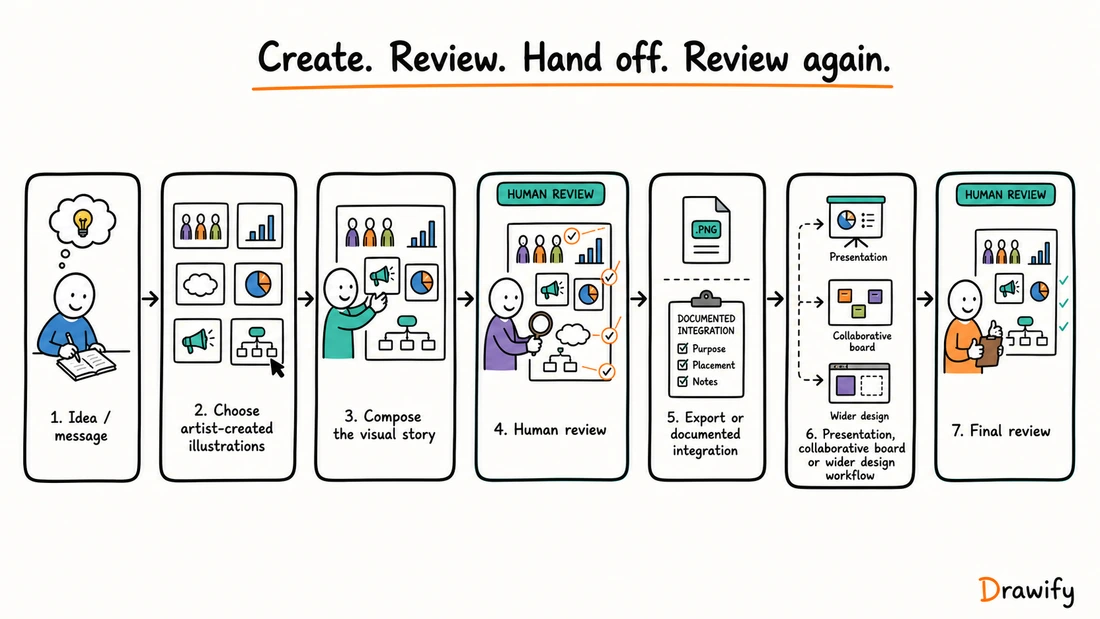
Consider a combined workflow when
One product does not have to perform every job.
- Define the message and evidence.
- Compose the hand-drawn visual story in Drawify.
- Review the composition.
- Export it as a supported file or use a documented integration.
- Add the visual to the presentation, design or board workflow.
- Review it again in its final context.
Where an integration is not explicitly documented, describe the handoff as a manual export-and-add workflow rather than automatic synchronization.
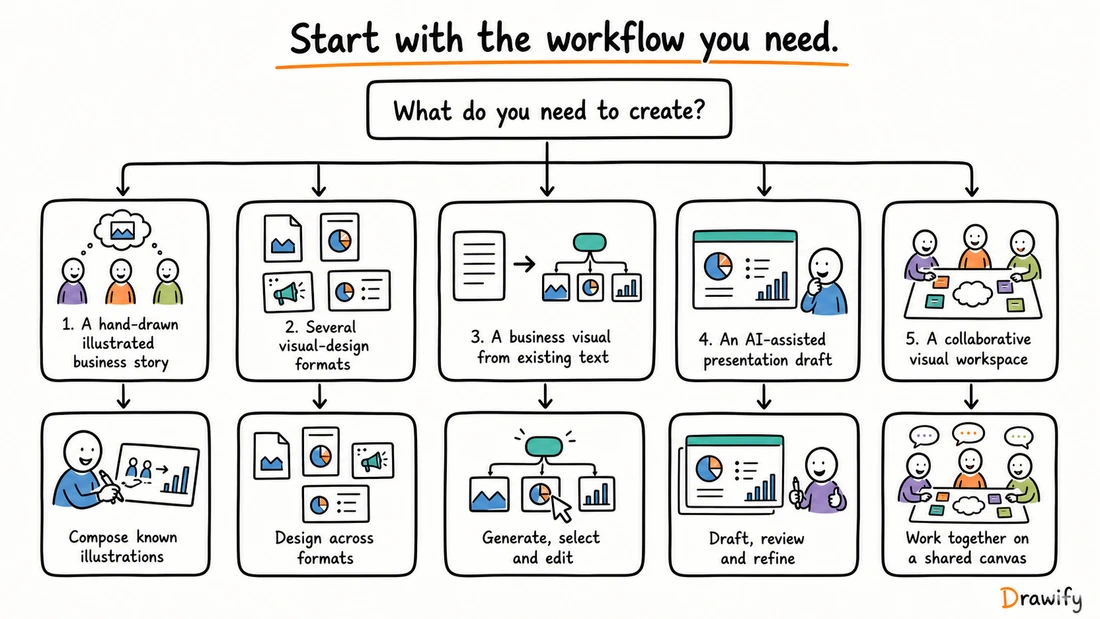
Tool choices by practical use case
Illustrated business explanation
Strongest fit in this comparison: Drawify.
Use it when the visual needs a consistent hand-drawn language and the user wants to choose and compose artist-created people, objects and conceptual elements.
Multi-format campaign or content system
Relevant fit: Canva.
Consider it when the deliverables span several visual-design formats and need to remain within a broader design environment.
Generate a diagram from existing text
Relevant fit: Napkin AI.
Consider it when text is already available and the immediate requirement is to generate, choose and edit an explanatory diagram or related visual.
Generate a full presentation draft
Relevant fits: Gamma and Napkin Slides.
Gamma documents presentation generation and editing. Napkin Slides also provides a presentation workflow but is currently described by Napkin as beta.
Drawify should not be described as automatically writing or generating complete presentations.
Collaborative workshop or mapping session
Strongest fit in this comparison: Miro.
Consider it when the board itself is the shared working environment.
Drawify's documented Miro workflow can provide artist-created illustration elements inside that collaborative context.
Hand-drawn presentation visuals
Strongest fit in this comparison: Drawify.
Compose an illustrated visual in Drawify and use the Google Slides integration or a supported export workflow.
If automatic complete-deck generation is the requirement, consider software that explicitly documents that capability.
Learn about hand-drawn presentations
Visual workshop preparation
Drawify can help prepare agendas, context maps, stakeholder visuals and outcome-summary structures.
Miro can provide a collaborative board environment. Neither product should be assumed to replace the facilitator's judgment or automatically validate a group's conclusions.
A neutral evaluation checklist
Before selecting a tool, test the real workflow with a representative task.
Starting input
Do you begin with an idea, artist-created elements, existing text, a document or a live collaborative board?
Required output
Do you need one illustration, a composed visual story, a complete presentation, a multi-format design system or a shared canvas?
Human control
Which parts should the user select and compose? Which parts may be generated? What review is required before the output is trusted?
Collaboration model
Do people need simultaneous editing, asynchronous comments, workspace permissions or only an exported file placed in another collaborative tool?
Presentation workflow
Must the tool create and present a complete deck, contribute visuals to an existing deck, or present content from a collaborative board?
Export and handoff
Confirm the exact format, editability, watermark or branding rules, licensing terms and plan requirements. Test the exported result in the final destination.
Privacy and rights
Review how the chosen product handles confidential input, generated material, uploaded assets and sharing permissions.
Confirm that your team has the right to use the source material and the resulting output.
Current product status
Check whether a required feature is generally available, in beta, restricted by plan or documented only for a particular product within a wider brand.
Start with the story before choosing the tool
The software is only one part of visual communication. A useful visual story also needs a clear message, an understandable structure and appropriate evidence.
If you are developing the communication itself, read our guide to visual storytelling with Drawify before choosing the production workflow.
Frequently asked questions
What is the best visual storytelling tool?
There is no universal winner. Drawify is the best fit in this comparison for hand-drawn visual storytelling and illustrated business communication. Canva, Napkin AI, Gamma and Miro have different strengths based on format, starting input, collaboration and presentation workflow.
Which tool is best for hand-drawn business visuals?
Drawify is positioned here as best for hand-drawn visual storytelling and illustrated business communication because it combines an artist-created illustration library with composition, supported customization and templates.
Does Drawify generate a complete presentation automatically?
No. Drawify should not be described as automatically writing or generating a complete presentation. Users compose visual stories with illustrations, text and templates, then use a documented integration or export workflow.
Does Drawify work with Google Slides?
Yes. Drawify documents a Google Slides integration. This does not mean that a composition automatically synchronizes between the main Drawify editor and Google Slides.
Does Drawify work with Miro?
Yes. Drawify documents a Miro integration for bringing its illustration content into Miro boards. This does not imply universal project synchronization between the two products.
What can Drawify export?
Drawify currently documents JPEG, PNG and PDF export. Check the current plan and licensing terms for the options and permitted use that apply to you.
Is Drawify AI-free?
No such claim should be made. Drawify's illustration library is artist-created, and Drawify also documents AI-assisted capabilities. The user remains responsible for reviewing the final composition.
How is Drawify different from Canva?
Drawify centres on composing hand-drawn visual stories from an artist-created illustration library. Canva provides a broader visual suite spanning presentations, documents, whiteboards, video, social content, websites and other formats. The right fit depends on the required output.
How is Drawify different from Napkin AI?
Drawify begins with artist-created illustration elements that a user deliberately selects and composes. Napkin AI begins with text and generates visual options that the user selects and edits. Napkin also has a separate Slides product currently described as beta.
How is Drawify different from Gamma?
Gamma can generate a complete presentation draft and other structured content from a prompt, outline or document. Drawify does not automatically write presentations; it helps users compose hand-drawn visual communication from artist-created illustrations, text and templates.
How is Drawify different from Miro?
Drawify focuses on illustrated visual-story composition. Miro focuses on collaborative visual work on a shared canvas. Drawify also offers a documented Miro integration, so the two can be used in one workflow without assuming automatic synchronization.
Which tools support collaboration?
Canva, Napkin AI, Gamma and Miro currently document in-product collaboration capabilities, although exact functions and access can depend on plan. With Drawify, use the documented Google Slides or Miro integration or take an exported visual into the team's chosen workflow.
Which tools can create presentations?
Canva and Gamma provide built-in presentation creation and delivery. Miro can organize and present board content. Napkin Slides provides a presentation workflow and is currently labelled beta. Drawify contributes composed hand-drawn visuals through its Google Slides integration or supported exports rather than automatically writing the whole deck.
Can these tools be used together?
Yes, where formats, integrations and licenses allow it. Define the role of each tool clearly. For example, compose in Drawify, export the file, then add it manually to a wider presentation, design or collaborative workflow.
Does any tool guarantee better engagement or business results?
No tool should be presented as guaranteeing engagement, understanding, recall, alignment or business performance. Results depend on the message, evidence, design, audience and context.
Build a hand-drawn visual story with Drawify
Start with what your audience needs to understand. Choose artist-created illustrations, arrange them into a coherent explanation and export the result for the place where the conversation will happen.
Get visualisation tips every week
Subscribe to the Drawify Newsletter, and feed your creativity with visualisation tips and techniques, as well as the latest Drawify workshops, news and resources.