
Drawify vs AI image generators: choose the right visual approach
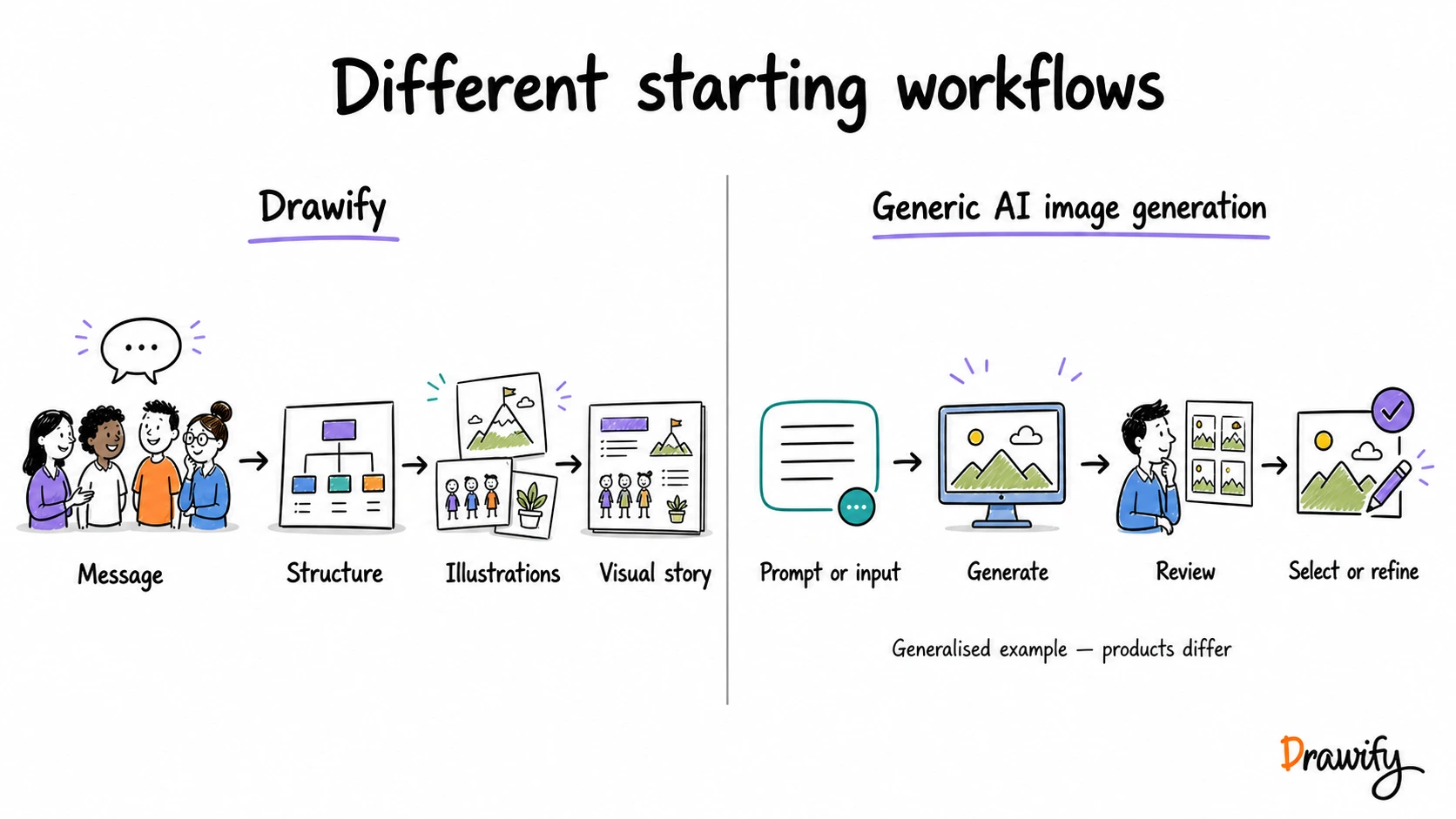
Drawify and AI image generators can both help create visual material, but they begin with different primary tasks.
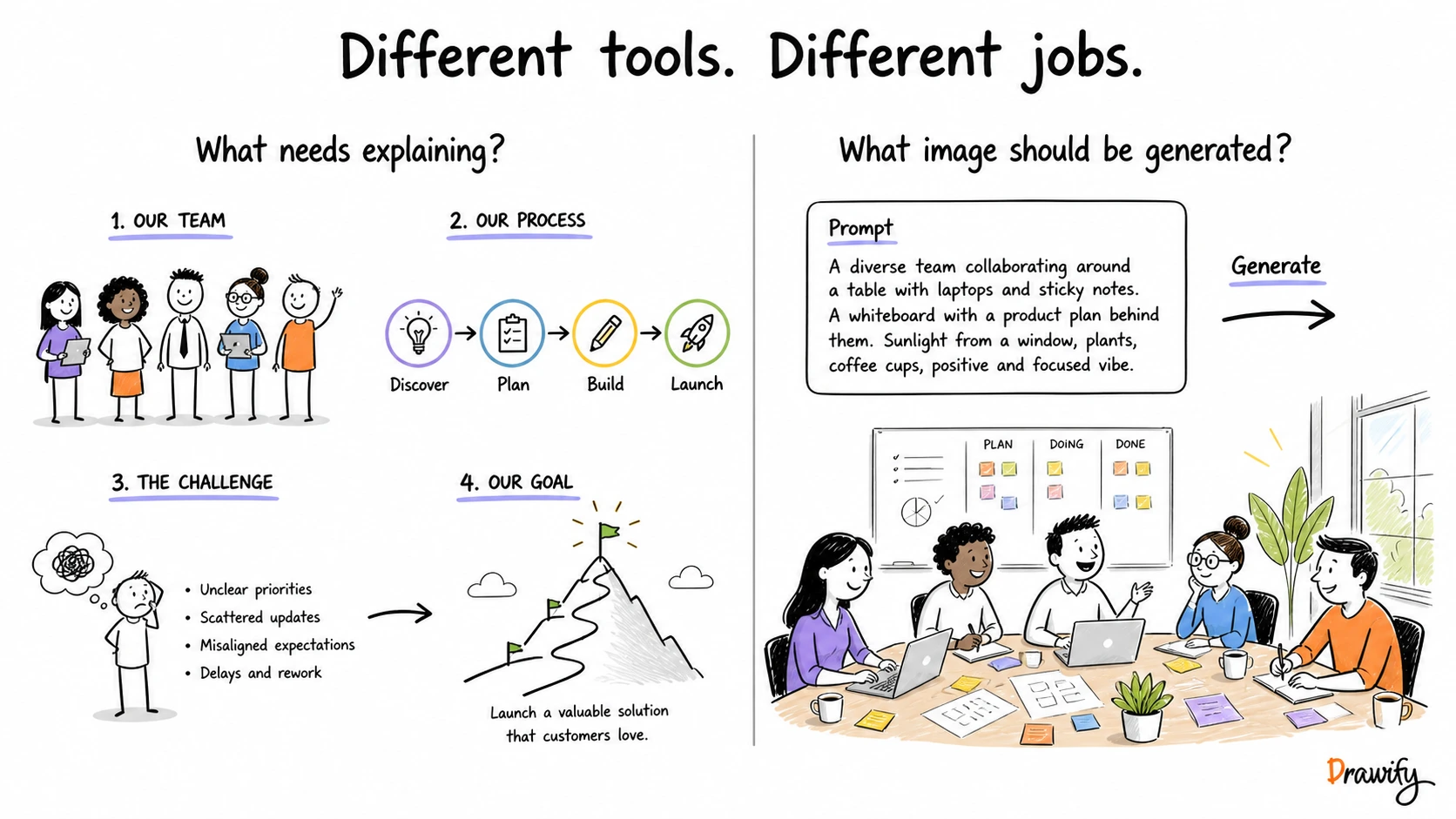
Drawify begins with: What needs explaining? You choose artist-created hand-drawn illustrations or a visual-story structure and arrange the elements, text and relationships into a composition.
A prompt-based AI image generator begins more like: What image should be generated? You describe a subject, scene, action or visual direction and review the resulting image output.
Neither approach is right for every task. The useful question is which workflow matches what you need to communicate or create.
The short answer
Choose Drawify when you need to explain a process, strategy, customer journey, stakeholder landscape, workshop flow or other structured business idea with a coherent hand-drawn visual language.
Consider an AI image generator when the main requirement is to create a new image for a particular scene, concept, atmosphere or visual direction.
A combined workflow may also make sense when a generated image is only one supporting element inside a larger explanation.
Drawify and AI image generators at a glance
| Consideration | Drawify | AI image generators |
|---|---|---|
| Primary focus | Composing structured visual stories with artist-created hand-drawn illustrations, templates and text | Generating or editing images from prompts and other supported inputs |
| Typical starting point | A message, process, relationship, journey or workshop structure | A description of an image, subject, action, setting or visual direction |
| Source material | A browsable library of artist-created illustrations, templates and supported user uploads | Newly generated image output based on the selected provider, model, inputs and settings |
| Core workflow | Select and arrange several visual elements, labels and relationships | Generate a result, review it and iterate using the controls supported by the selected product |
| Useful for | Strategy visuals, processes, stakeholder views, workshops, explanations and presentation stories | New scenes, concept exploration, contextual imagery and supported image-editing tasks |
| Control | Direct selection and placement of known visual elements | Depends on the generator; available prompt, reference, mask and editing controls vary |
| Review | Review the message, labels, relationships and factual claims | Review visual details, text, factual implications, identity, context and applicable terms |
These are common workflows, not universal limitations. Individual AI image products can differ substantially.
What Drawify is designed for
Begin with the communication problem
Before choosing an illustration, define what the audience needs to understand, discuss or decide.
For example:
- Where does this process become blocked?
- Which stakeholder decides, delivers, uses or is affected?
- What is observed evidence and what is still an assumption?
- How does the current reality lead to a proposed direction?
- What should happen after this workshop?
Browse artist-created illustrations
Choose people, objects, actions and visual metaphors from Drawify's illustration library when they represent the real meaning of the story.
Start from a visual-story template
Use a template when a strategy, process, workshop, presentation or other visual structure provides a useful starting point.
Replace generic labels with the actual evidence, assumptions, decisions and next actions relevant to the work.
Compose the relationships yourself
Arrange illustrations, text and connectors on the Drawify canvas.
Use position, sequence, scale and explicit labels to make the relationships visible.
Export the complete visual
Drawify supports PNG, JPEG and PDF export.
What AI image generators are designed for
AI image generators create image output from user instructions.
The exact workflow depends on the selected product, model, interface and account.
Generate a new image from a prompt
A user may describe a subject, action, setting, composition or visual direction and request an image based on that input.
This can be useful when the visual you need does not already exist as a suitable asset.
Explore visual directions
Some products support repeated generation or variations that can help explore composition, setting or style.
Do not assume every generator returns the same number of options or exposes the same controls.
Edit or transform an existing image
Some AI image generators support editing generated or uploaded images.
The available operations and limitations vary, so check the current documentation for the exact product.
Create a highly specific scene
Generation may be useful when the task requires a specific combination of subject, environment, action and visual treatment.
The result still needs human review. A generated image should not be treated as evidence that a real event, customer situation or business result actually exists.
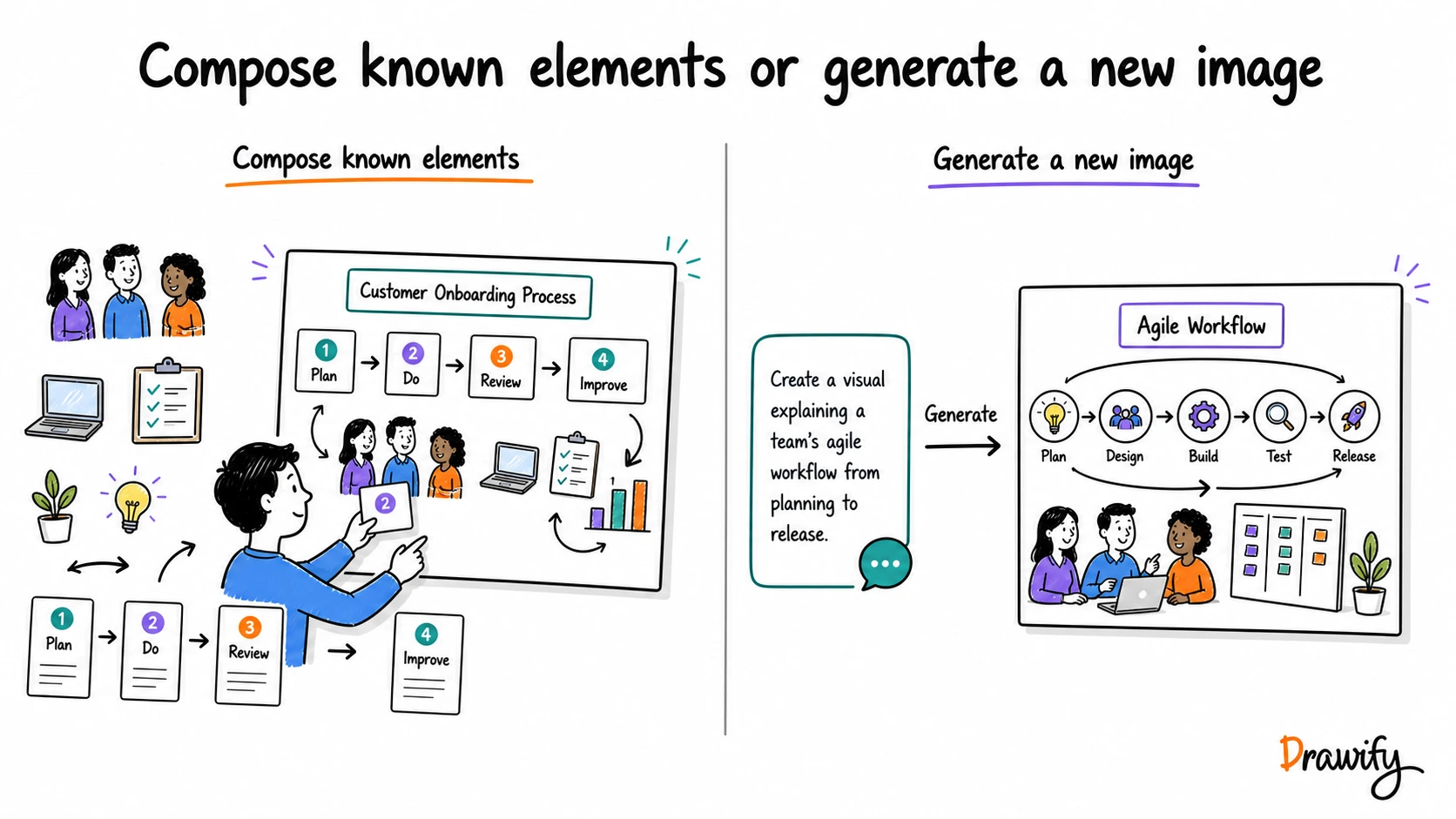
The central difference: composing known elements or generating a new image
Drawify's core workflow is selection and composition.
You choose visual elements and intentionally arrange them to explain a message.
A common AI image-generation workflow is prompting and generation.
You describe an intended image, inspect the output and iterate.
This is not a claim that AI generators cannot make diagrams or that Drawify does not use any AI-assisted functionality.
Drawify also documents AI-assisted features. The comparison here is about the primary workflow and source material.
When Drawify may be the better fit for the task
Strategy and change stories
Show current reality, strategic tension, insight, proposed direction and next action as distinct stages.
Label future states as proposed until they have actually occurred.
Process explanations
Illustrate stages, roles, handoffs and bottlenecks.
Use explicit labels so the meaning does not depend on proximity alone.
Stakeholder maps
Combine illustrated roles with relationships such as decides, delivers, uses, advises and is affected by.
Workshops
Create visual agendas, activity instructions, synthesis structures and outcome summaries.
Drawify helps prepare the visual material; it should not be described as automatically facilitating or analysing a workshop.
Customer journeys
Show customer actions, contact points, observed evidence, assumptions and open questions across stages.
Presentation visuals
Build a coherent visual story in Drawify and export it for the presentation workflow.
When an AI image generator may be the better fit for the task
A scene that is not available in a library
Generate a new image based on a specific combination of subject, action, environment and visual direction.
Early visual concept exploration
Explore possible visual directions before committing to the final communication design.
Contextual or atmospheric imagery
A generated setting or scene may fit work where the overall visual impression matters more than arranging several separately labelled business elements.
Supported image editing
Some image generators can perform edits such as replacing an object, changing a background or working from a reference image.
Confirm the current product supports the exact operation you need.
One-off creative assets
A generator may fit an article illustration, campaign concept or other creative experiment when the result is reviewed before publication.
Do not describe generated output as guaranteed unique or automatically licensed for every use.
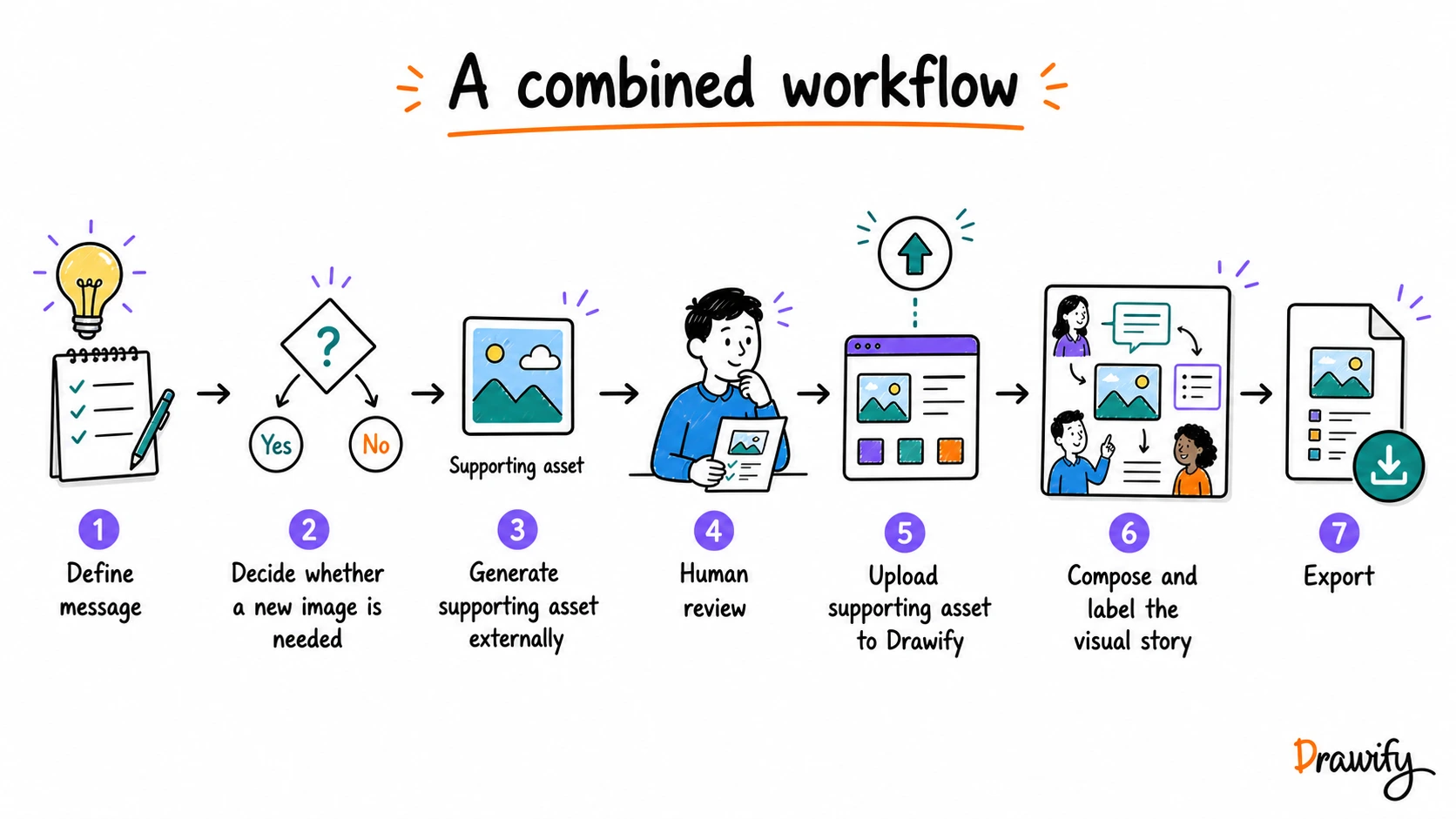
When to use Drawify and an AI image generator together
1. Define the message
Write what the audience needs to understand.
Separate evidence, interpretation, proposals and next actions before creating supporting imagery.
2. Decide whether generation is actually needed
Search Drawify's illustration library and templates when the story can be composed from existing visual elements.
Consider generation when the story genuinely needs a specific new scene, background or supporting asset.
3. Generate the supporting asset
Use a product whose current capabilities and terms fit the intended use.
4. Review the result
Check:
- visual details;
- unexpected text or symbols;
- factual implications;
- identity and sensitive situations;
- brand elements;
- provider-specific usage requirements; and
- suitability for the audience.
5. Add the reviewed image to Drawify
Where the current Drawify plan and upload workflow support it, use the reviewed image as a supporting element.
6. Compose and export the complete story
Add labels, relationships and other Drawify elements so the generated image supports the explanation rather than becoming the evidence for it.
A practical decision checklist
- Is the main task to explain a relationship or to generate a new image?
- Does the visual need several labelled elements and an explicit reading order?
- Is a coherent hand-drawn visual language important across several scenes?
- Does the visual you need already exist in an appropriate illustration library?
- Does the work require a highly specific generated setting or subject?
- Can the output be properly reviewed before publication?
- Does the selected generator document the exact capability you need?
- Are the applicable product and usage terms suitable for the intended work?
What this comparison does not claim
To keep the comparison fair, this page does not claim:
- that every AI-generated image is generic, inconsistent, inaccurate or low quality;
- that AI image generators cannot create hand-drawn styles, diagrams, text or editable results;
- that every generator supports the same inputs, edits, sizes or formats;
- that generated output is automatically unique, copyright-safe or commercially licensed;
- that Drawify is AI-free;
- that Drawify automatically verifies the facts or reasoning in a visual;
- that either approach is universally faster, cheaper or more creative; or
- that either approach guarantees better communication outcomes.
Frequently asked questions
Is Drawify an AI image generator?
Drawify is a visual storytelling platform centred on artist-created hand-drawn illustrations, templates and composition tools. Drawify also documents AI-assisted features, so it should not be described simply as an AI image generator or as an AI-free product.
Are Drawify illustrations made by real artists?
Drawify describes its core illustration library as created by professional visual artists. The applicable asset and plan terms should still be checked for the specific use case.
What does an AI image generator do?
An AI image generator creates image output from instructions such as a text prompt. Some products also support reference images, uploaded-image editing, variations or other controls. Exact features depend on the provider, model and account.
Is Drawify better than an AI image generator?
Not for every task. Drawify may fit a structured business explanation that needs known visual elements, labels and relationships. An AI image generator may fit a new scene or concept that needs to be generated from a description. The workflows can also be combined.
Can AI image generators create hand-drawn images?
Some image generators can produce illustration-like or hand-drawn visual treatments. Results and controls vary. Drawify's distinction is its artist-created illustration library and structured visual-story workflow, not exclusive ownership of a hand-drawn appearance.
Can I use an AI-generated image in Drawify?
Drawify supports uploading and integrating user images in supported workflows. Review the generated image and the provider's terms first, then use it as a supporting element where the current Drawify plan and upload workflow allow it.
Can I edit a generated image?
Some AI image generators support editing generated or uploaded images. Others provide different controls. Check the current documentation for the exact product you are considering.
Does a generated image need review?
Yes. Review visual details, text, factual implications, identity, sensitive content, brand elements and the provider's current usage terms before publishing or using the image with a client.
Does Drawify automatically create the right business story?
No. Drawify provides illustrations, templates and composition tools, with supported AI-assisted features that can help the workflow. The user remains responsible for the message, evidence, labels, interpretation and final decisions.
Which approach is more consistent?
That depends on the Drawify illustrations selected, the AI generator used, any references or controls available and the way the work is reviewed. Do not assume identical consistency from either approach without testing the actual workflow.
Which option is cheaper?
This page does not compare pricing. Drawify plans and AI-provider pricing, credits, limits and terms can change. Review the current official pricing information for the exact products being considered.
Can either approach guarantee better communication?
No. A relevant visual can support a well-structured message, but neither an artist-created illustration nor a generated image guarantees understanding, recall, persuasion or action.
Start with the message, then choose the image workflow
Use Drawify to turn a process, strategy, journey or workshop idea into a structured hand-drawn visual story.
Add generated imagery only when it serves a clear purpose and has been reviewed for the intended use.
Get visualisation tips every week
Subscribe to the Drawify Newsletter, and feed your creativity with visualisation tips and techniques, as well as the latest Drawify workshops, news and resources.