
Make workshops easier to follow with visual storytelling
Turn agendas, discussion topics, activities and outcomes into visual stories participants can understand at a glance.
Drawify helps facilitators combine artist-created hand-drawn illustrations, text and templates into purposeful workshop visuals.
Prepare them in the Drawify editor, export them for your workshop materials, or use Drawify's available integrations when they suit your workflow.
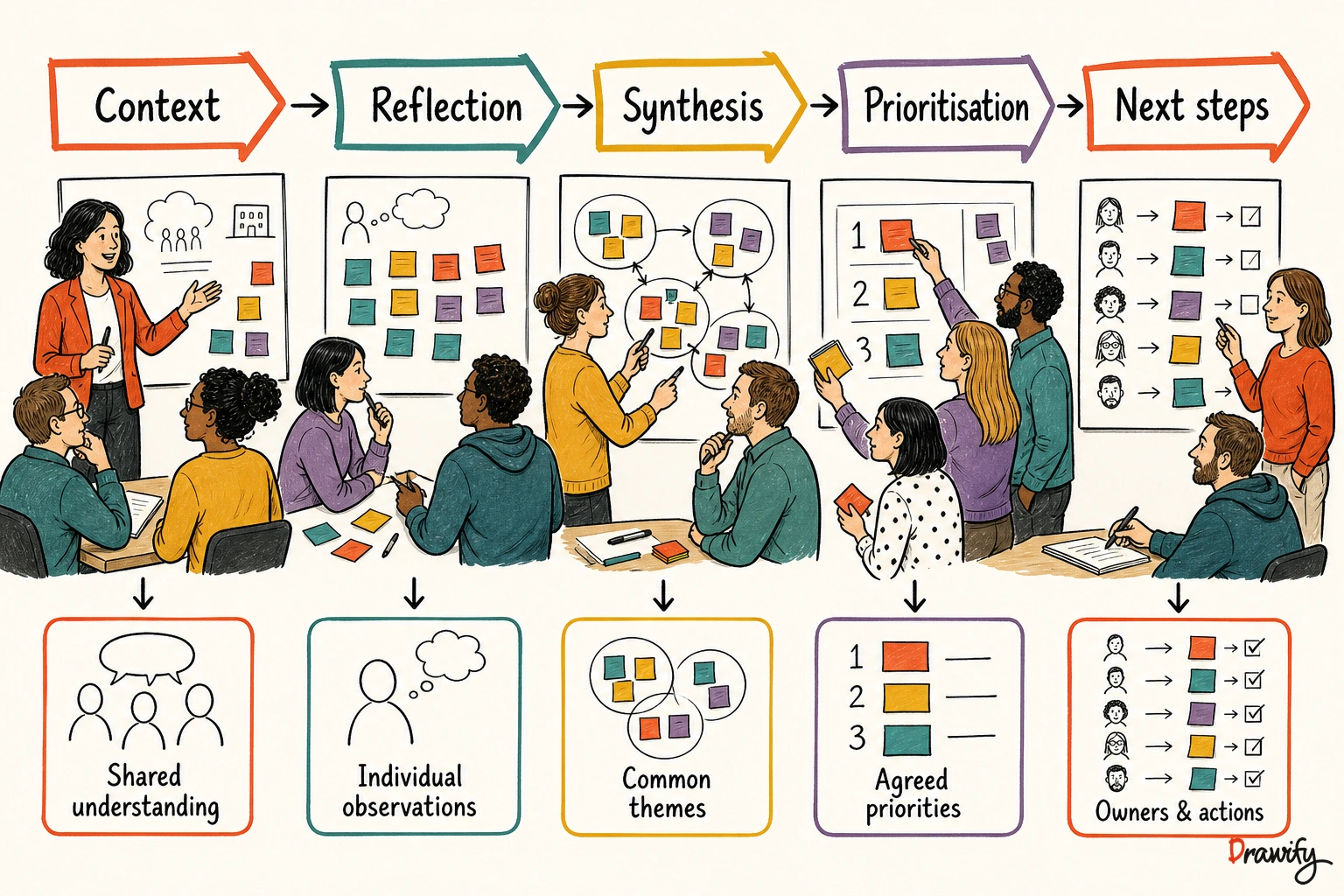
A good workshop needs more than a list of activities
Participants need to understand where the conversation is going, what they are being asked to contribute and what should exist by the end.
Visual storytelling can make that structure visible.
Instead of presenting an agenda as disconnected bullet points, you can show a journey from context and reflection to synthesis, prioritisation and action.
The goal is not to decorate every workshop slide or board.
It is to use visuals where they help the group understand:
- Why the workshop is happening.
- How one activity connects to the next.
- Where individual contributions fit.
- What the group has learned.
- Which decisions have been made.
- What happens after the session.
For the broader approach, see what visual storytelling is .
Use visual storytelling before, during and after a workshop
Before the workshop: clarify the journey
Create a visual overview that shows participants what they will work through.
A workshop journey might include:
- Context
- Individual reflection
- Group synthesis
- Prioritisation
- Next steps
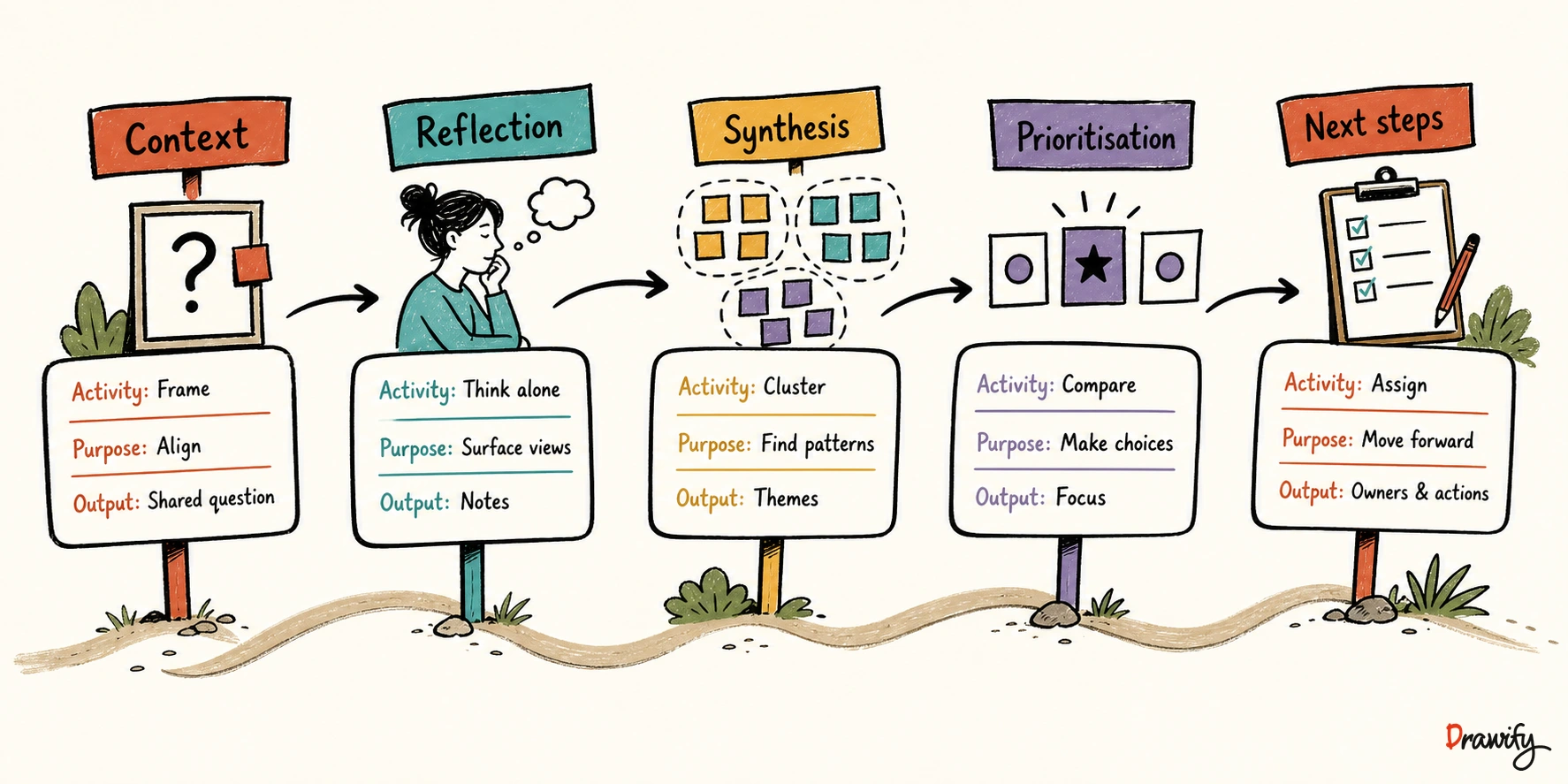
Give every stage an intended output.
For example, individual reflection might produce observations and questions, while prioritisation should produce an agreed focus.
During the workshop: support the conversation
Use simple visuals to introduce an activity, explain a process or help participants see relationships.
A relevant hand-drawn illustration can give a group a shared point of reference without replacing the facilitator's explanation.
When working in Miro, Drawify's Miro integration can support the use of Drawify illustrations on the board.
Learn about Drawify for Miro .
After the workshop: communicate what happened
Workshop notes often make sense to participants in the moment but become difficult to interpret later.
Create a follow-up visual that separates:
- What participants contributed.
- What themes were identified.
- What was decided.
- What remains unresolved.
- Who owns the next action.
You can compose this summary in Drawify and export it as PNG, JPEG or PDF for use in your chosen follow-up materials.
Practical workshop and facilitation use cases
Visual workshop agendas
Show the workshop as a connected journey rather than a timetable alone.
For each stage, include the purpose, participant activity, intended output and transition to the next stage.
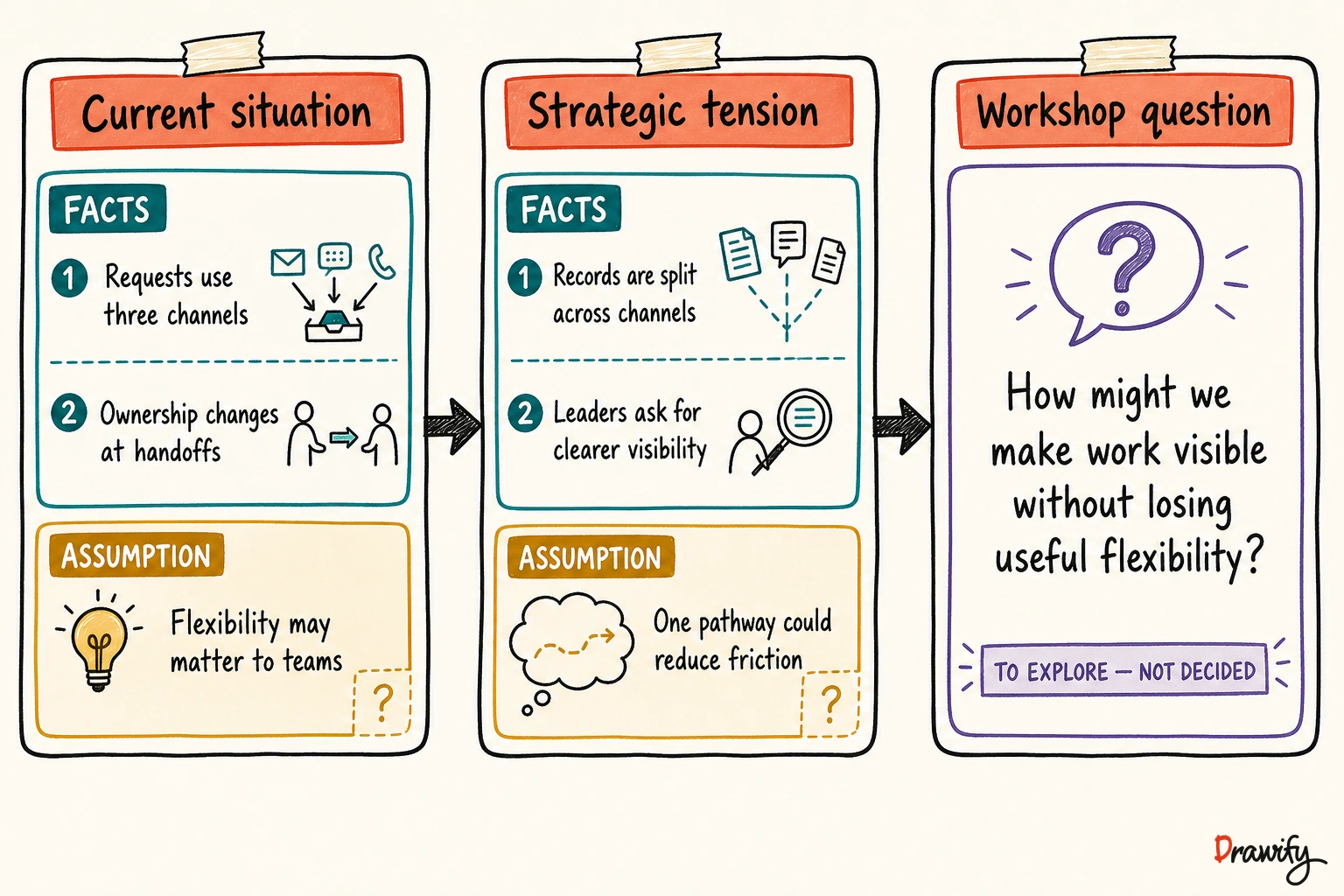
Context-setting visuals
Explain the situation that brought the group together.
Keep verified facts separate from assumptions and hypotheses.
Individual reflection prompts
Use a simple illustration and one focused question to give participants a clear starting point.
The visual should support the prompt, not compete with it.
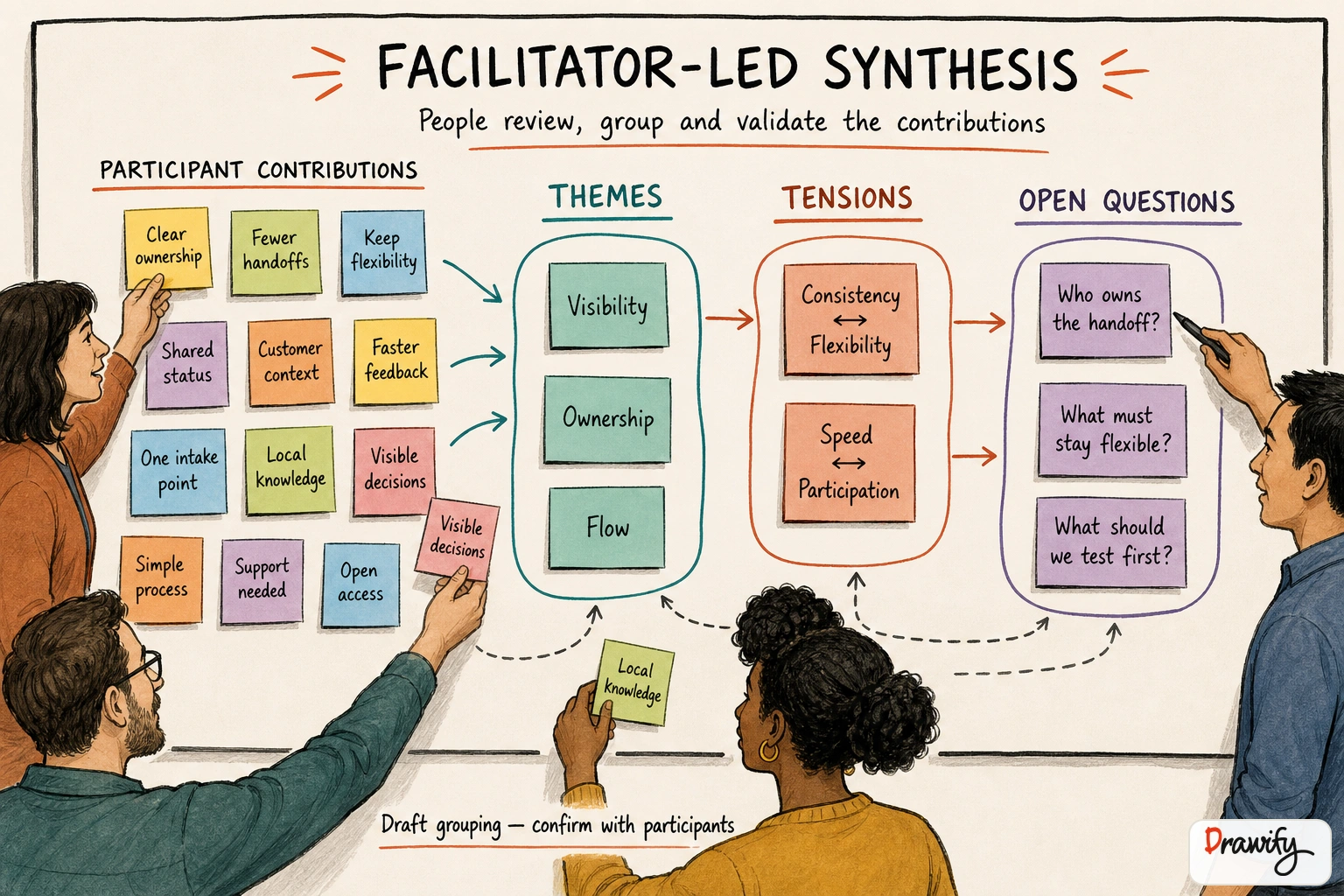
Group synthesis
Turn individual contributions into a shared picture using repeated themes, different perspectives, tensions, dependencies and open questions.
Do not force agreement by making the picture appear more settled than the conversation actually was.
Prioritisation
Make the basis for prioritisation visible.
Show the criteria being used, the choices under consideration and the trade-offs involved.
Avoid presenting a subjective choice as an objective score unless the group has genuinely agreed on the scoring method.
Process and bottleneck discussions
Illustrate the main stages of a process and identify where a delay, approval or handoff requires attention.
Distinguish the current process, the problem being investigated and any proposed future process.
Do not add invented performance figures or claim that a proposed change will automatically improve results.
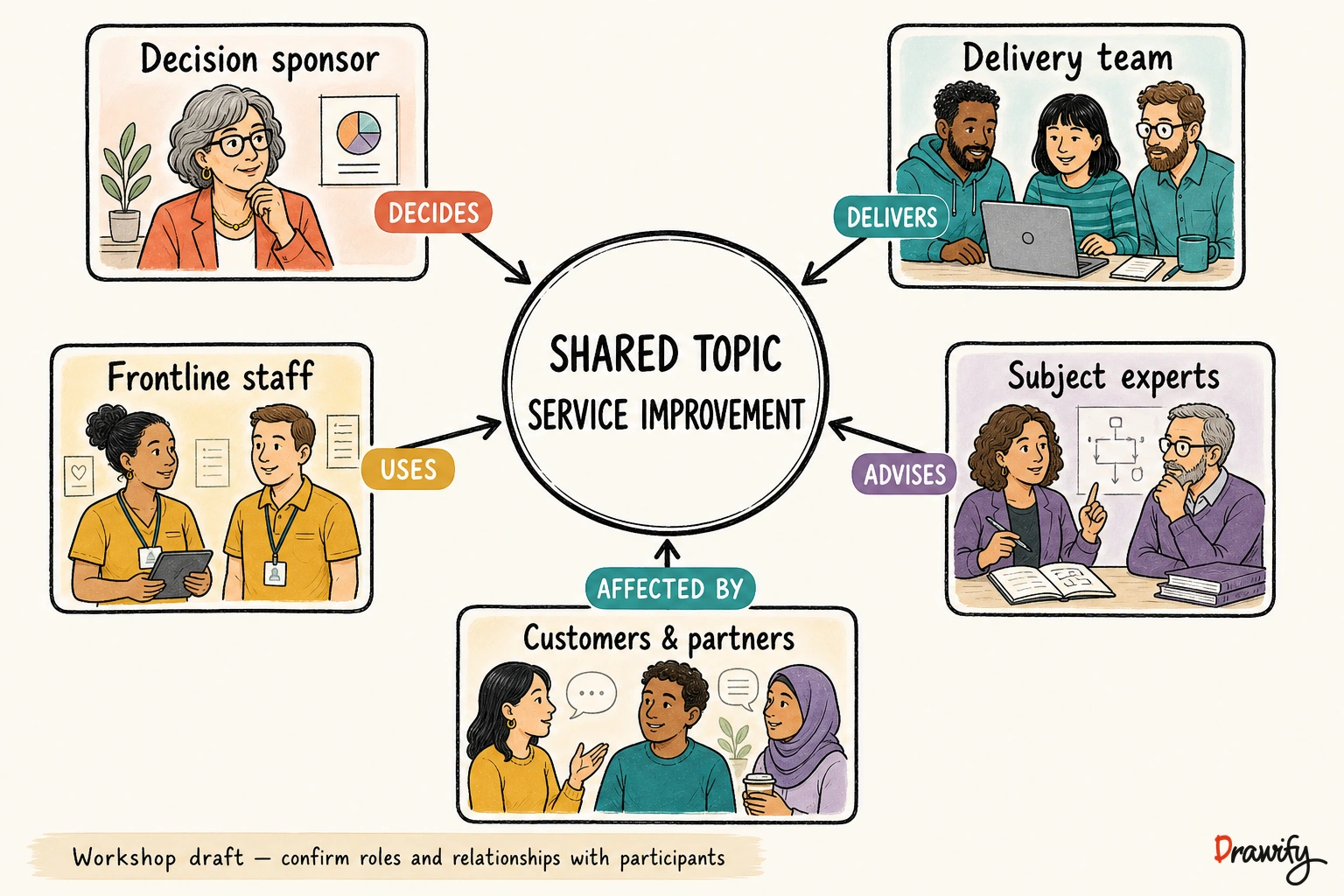
Stakeholder mapping
Use illustrated roles to show who decides, delivers, uses, advises and is affected by the outcome.
Label the relationships explicitly.
Current-state and future-state conversations
Create a before-and-after structure showing the current reality, proposed transition and intended future state.
Clearly label the future state as an intention or proposal rather than an achieved outcome.
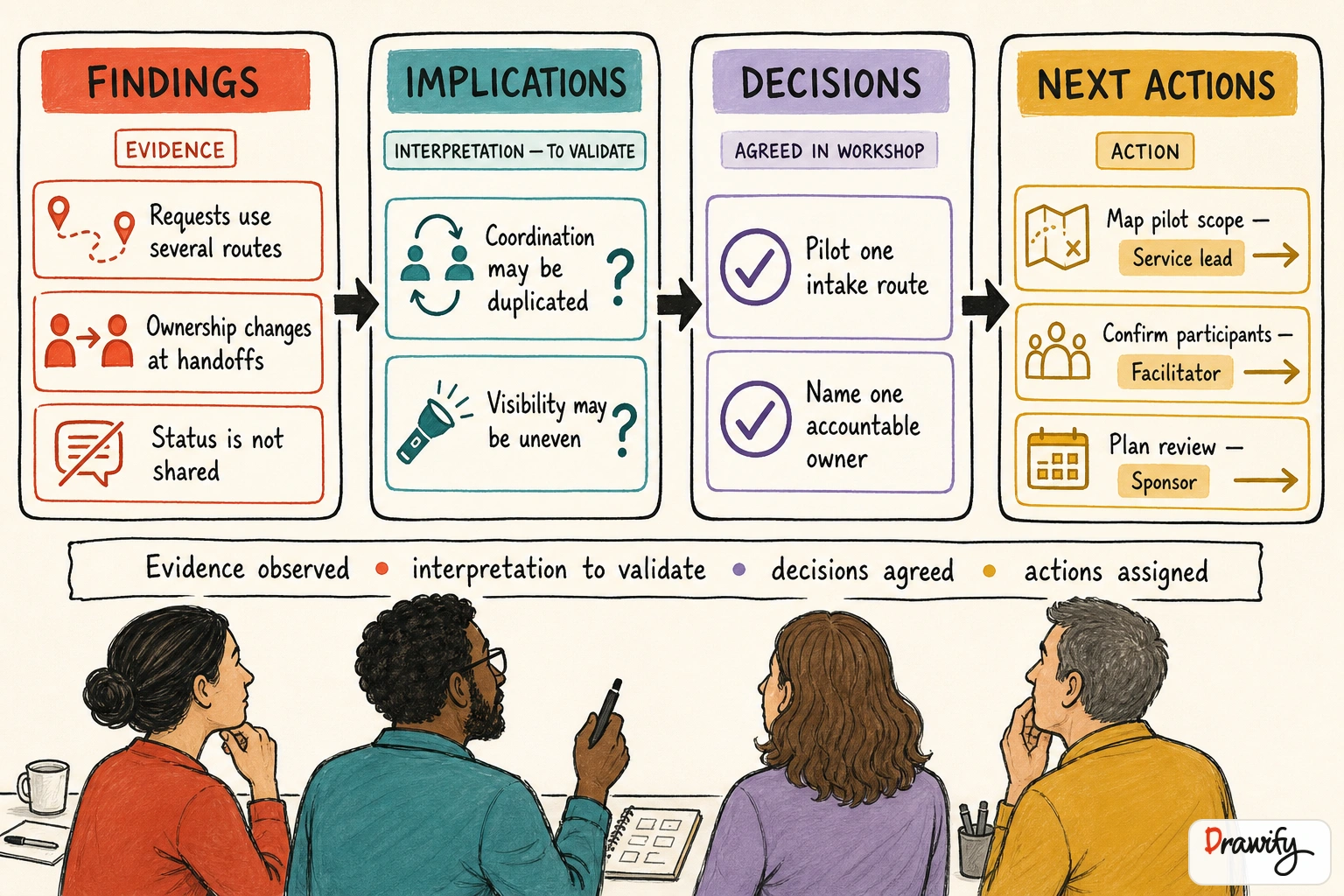
Workshop outcome summaries
Turn the final discussion into a concise visual record containing main findings, agreed implications, decisions, open questions, owners and immediate next steps.
How Drawify supports workshop visual storytelling
Drawify helps professionals build visual stories using artist-created hand-drawn illustrations, templates, text and visual composition tools.
You can use Drawify to:
- Browse artist-created illustrations.
- Start from a suitable visual or workshop template.
- Combine illustrations and text into a structured composition.
- Arrange and customise the visual story.
- Export finished work as PNG, JPEG or PDF.
- Use available Google Slides and Miro integrations when they fit the workshop workflow.
Drawify does not replace workshop planning, facilitation or participant input.
It provides visual material and composition tools that help communicate those elements more clearly.
Choose the workflow that fits your workshop
Create the full visual in Drawify
Use the main Drawify editor when you need to combine multiple illustrations and text into a complete visual composition.
- Define the message or workshop stage.
- Find a relevant illustration or template.
- Compose the visual story.
- Customise the composition.
- Export the result.
- Add the exported file to your workshop deck, document or board.
Use Drawify illustrations in Miro
Use Drawify's Miro integration when the workshop is being prepared or facilitated on a Miro board and you need relevant Drawify illustrations there.
Keep the distinction clear between the Drawify illustration and workshop content created by participants.
Learn about using Drawify with Miro .
Use Drawify with Google Slides
For slide-based workshops, the Google Slides add-on can be used to choose and insert a ready-made Drawify asset.
For a more complex multi-element visual:
- Compose the visual in the main Drawify editor.
- Export the finished image.
- Manually add it to Google Slides.
Do not describe this exported workflow as automatic synchronisation.
Build workshop visuals people can trust
Separate evidence from interpretation
If a workshop visual contains findings and conclusions, label them separately.
- Finding: Requests arrive through several channels.
- Implication: The team may be spending extra time coordinating them.
- Recommendation: Test a single intake pathway for one service area.
Show decisions as decisions
Do not present a recommendation as approved until the responsible stakeholder has made that decision.
Useful labels include:
- Proposed
- To validate
- Decision required
- Agreed
- Open question
- Next test
Keep participant contributions recognisable
When synthesising a workshop, avoid simplifying the material so aggressively that participants no longer recognise what they said.
Use themes to organise the conversation while preserving meaningful differences, uncertainties and dissent.
A simple workshop visual storytelling workflow
1. Define the purpose
Write one sentence explaining what participants should understand, contribute or decide.
2. Identify the workshop stages
Choose only the stages the group needs.
3. Define the output of each stage
- Context → shared understanding.
- Reflection → observations and questions.
- Synthesis → themes and tensions.
- Prioritisation → agreed focus.
- Next steps → owners and actions.
4. Choose visuals that clarify meaning
Search for illustrations that represent the idea, relationship or transition being discussed.
A relevant visual is more useful than several decorative ones.
5. Compose and label the story
Combine illustrations with short headings, arrows, relationships and concise supporting text.
6. Add the visual to your workshop materials
Export the composition or use an available Drawify integration, depending on how the workshop will be delivered.
7. Update the story after the session
Replace assumptions with verified findings, add decisions and record the next actions.
Frequently asked questions
What is visual storytelling for workshops?
Visual storytelling for workshops uses illustrations, text and visual structure to explain the workshop journey, support activities and communicate outcomes. It can help participants understand how the different stages and contributions connect.
Can Drawify run an online workshop?
No. Drawify is a visual storytelling platform, not a video-conferencing or complete workshop-management platform. Use it to create visual workshop materials alongside the meeting, presentation or collaboration tool chosen for the session.
Can I use Drawify with Miro?
Yes. Drawify has a Miro integration that supports using Drawify illustrations on Miro boards. Follow the dedicated Drawify for Miro workflow for current capabilities and permissions.
Can I use Drawify with Google Slides?
Yes. You can use the Google Slides add-on to select and insert a ready-made Drawify asset. For a more complex multi-element composition, create it in Drawify, export it and manually add the exported image to Google Slides.
Does Drawify automatically synchronise exported visuals?
Do not assume automatic synchronisation. When a visual is composed in the main Drawify editor and exported for another tool, treat it as a manual export-and-add workflow unless a current integration explicitly documents otherwise.
Can I export workshop visuals?
Yes. Drawify supports PNG, JPEG and PDF export. Choose the format that suits the workshop material where the visual will be used.
Does Drawify provide workshop templates?
Drawify includes presentation and workshop templates alongside its artist-created illustration library and composition tools. Select a starting point that fits the workshop's real purpose, then adapt the content and structure.
Do workshop visuals need illustrations at every stage?
No. Use illustrations where they clarify a concept, relationship or transition. Some stages may be clearer with simple text, participant contributions or a labelled process structure.
Can Drawify summarise participant contributions automatically?
This page does not claim automatic workshop synthesis. Facilitators remain responsible for reviewing contributions, identifying patterns and confirming that the summary represents the discussion accurately.
Give your next workshop a clearer visual journey
Create an agenda participants can follow, activity visuals that support the conversation and a follow-up story that makes outcomes easier to understand.
Get visualisation tips every week
Subscribe to the Drawify Newsletter, and feed your creativity with visualisation tips and techniques, as well as the latest Drawify workshops, news and resources.