
Visual facilitation: make the conversation visible
Visual facilitation uses images, spatial structure, labels and connections to support a group conversation.
Drawify fits naturally when you need artist-created hand-drawn illustrations, adaptable templates or a composed visual for a meeting or workshop.
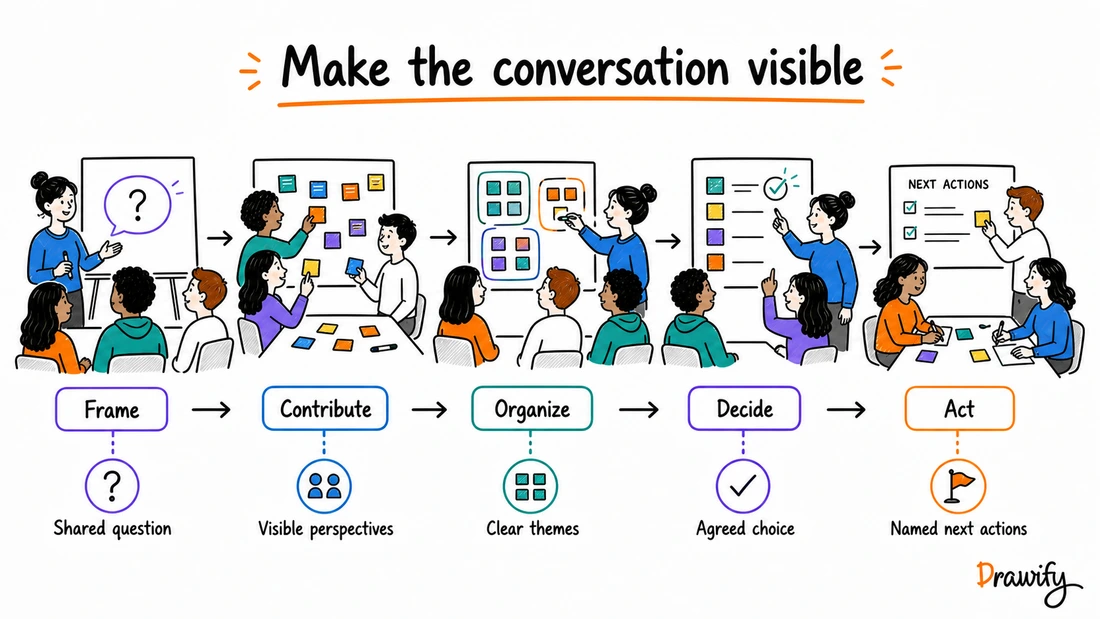
From reading to creating
Make your next team introduction a useful conversation
Give each participant a Personal User Manual to explain how they work. Discuss differences together instead of guessing what colleagues need.

Worked example: introducing a new teammate
- How I work best
- Quiet time in the morning; discussion after lunch.
- How to contact me
- Write the context and deadline before requesting a call.
- What helps me
- Share an example of the expected result.
- Discussion prompt
- What one working agreement would help both of us?
Open the template, add your own answers and bring the exported visual to the meeting. For group co-editing or comments, use your chosen collaboration tool; this example does not require simultaneous editing in Drawify.
Use the Personal User Manual templatePreview the template, then choose Customise to edit it. Sign-in and your plan’s access rules apply.
What is visual facilitation?
It can help participants see the question, follow the process, contribute ideas and understand what the group has produced. The facilitator still designs the session, asks the questions, manages participation, listens for meaning and helps the group decide what happens next.
Visual facilitation is the deliberate use of visual material to support how a group thinks and works together.
A facilitator might use:
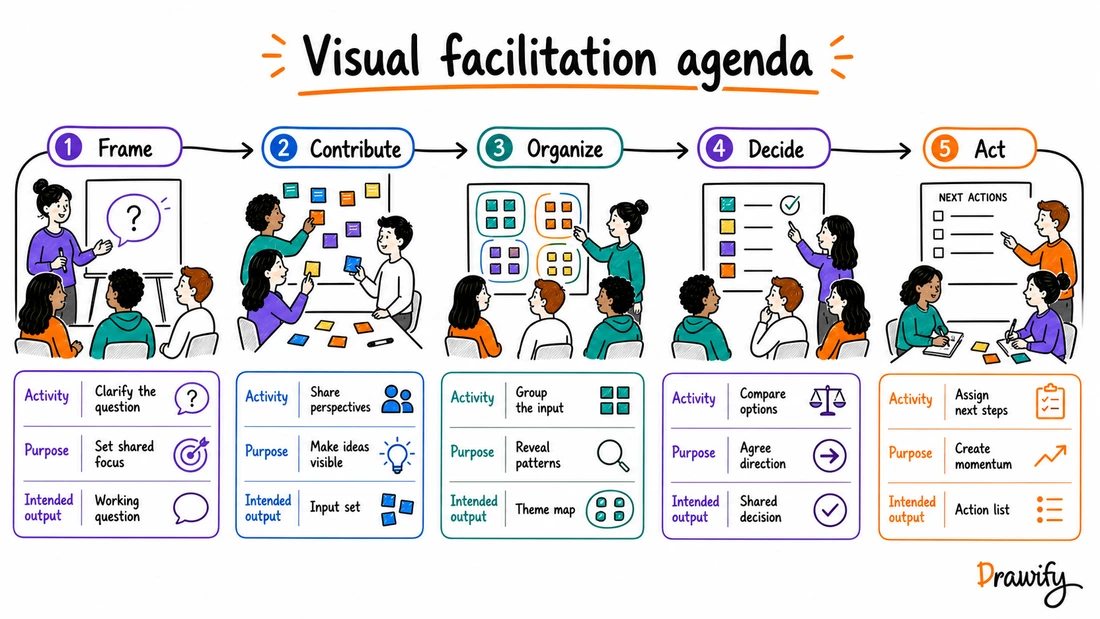
- A visual agenda showing the purpose and intended output of each stage.
- A context map separating facts from assumptions.
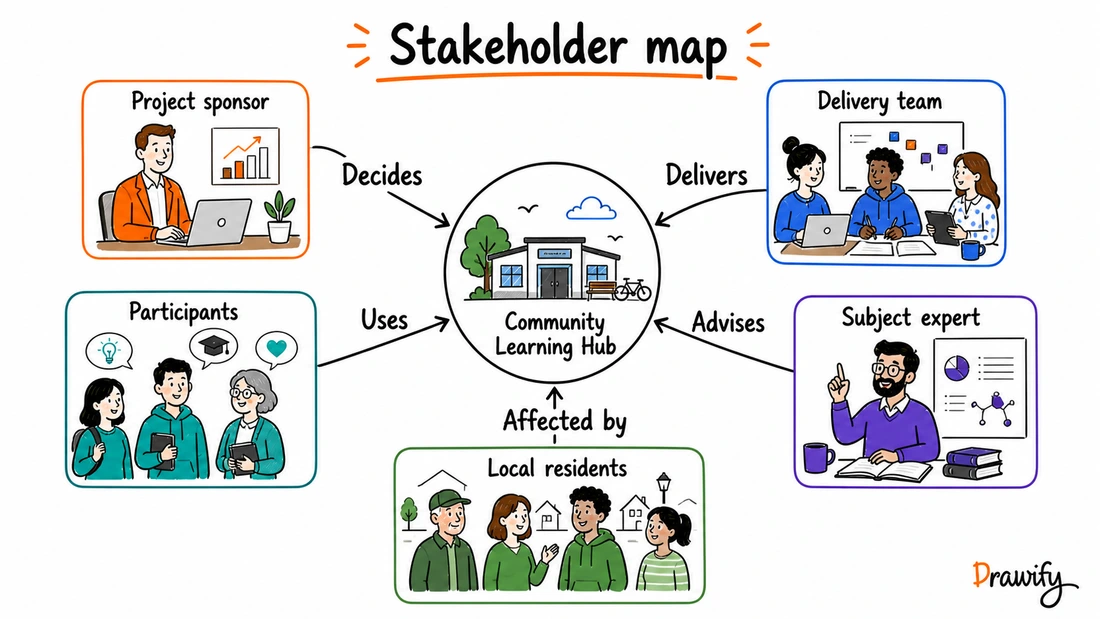
- A stakeholder map with labelled relationships.
- A process picture showing a handoff or bottleneck.
- A customer journey.
- A synthesis structure for contributions, themes and open questions.
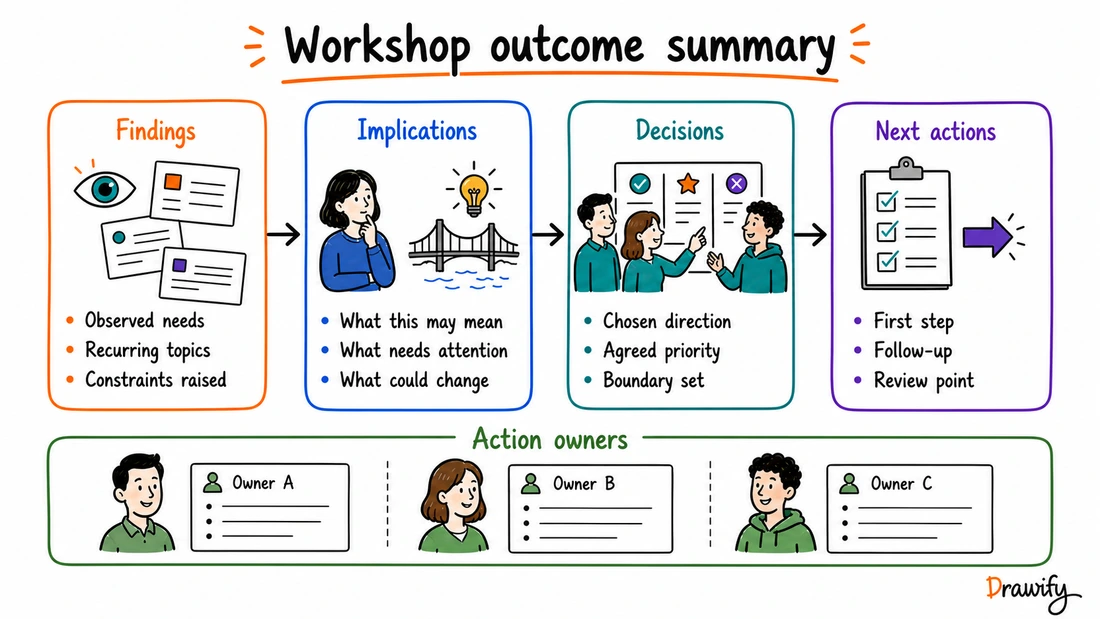
- An outcome summary separating findings, implications, decisions and next actions.
The visual can be prepared before the session, used during the discussion or refined afterwards.
What visual facilitation is not
Visual facilitation is not simply adding illustrations to a slide or filling a board with decorative icons.
A template also does not automatically capture the group's meaning.
Participants and facilitators still provide the content, test assumptions, interpret what they hear and make decisions.
A useful facilitation visual should have a clear job:
- Orient the group.
- Frame a question.
- Show relationships.
- Make contributions visible.
- Support comparison or prioritisation.
- Preserve uncertainty.
- Clarify decisions and ownership.
Why use visuals in facilitation?
Give the group a shared reference point
A visible question, journey or map gives participants something concrete to examine, discuss and correct.
Show how the session will move
A visual agenda can make the sequence, purpose and intended output of each activity easy to find.
Make relationships explicit
Arrows, lanes, boundaries and labels can show sequence, responsibility, influence or dependency.
Do not rely on proximity alone. If one role decides and another delivers, label those relationships.
Separate different kinds of information
Keep observed evidence, participant contributions, assumptions, interpretation, decisions and proposed actions visibly distinct.
Give the group a visible output
A final visual can show what was found, what it means, what was decided and what remains open.
That summary still needs human review.
Where Drawify fits in visual facilitation
Drawify is a visual storytelling platform for combining artist-created hand-drawn illustrations, templates and text into visual stories.
Prepare visual material before the session
Create a visual agenda, context map, stakeholder landscape, process flow or activity instruction before participants arrive.
Start from a relevant template
Drawify includes templates for meetings and other business contexts.
Choose the template after designing the session, then adapt its questions, flow and labels to the actual purpose.
Add artist-created illustrations
Use illustrated people, objects, actions and metaphors to identify roles, moments and ideas.
Choose visuals because they clarify meaning, not simply because they fill space.
Compose a complete facilitation visual
Arrange illustrations, text, arrows and areas on the Drawify canvas.
Make the reading direction and participant task obvious.
Export the finished material
Drawify supports JPEG, PNG and PDF export.
Use Drawify with Miro
Drawify provides a Miro app for adding supported Drawify content to a Miro board.
Miro remains the collaboration and facilitation workspace.
Learn about Drawify for Miro .
Use Drawify with Google Slides
Use the Google Slides add-on when a slide needs a ready-made Drawify asset.
For a complete multi-element visual, compose it in Drawify, export it and manually add the file to the presentation.
A practical visual-facilitation workflow
1. Define the purpose
Write what the group needs to understand, explore, decide or produce.
2. Understand the participants and constraints
Consider group size, time, location, accessibility, language, familiarity with the topic and available technology.
3. Design the conversation
For each stage, define:
- Activity: what participants will do.
- Purpose: why they are doing it.
- Intended output: what should exist afterwards.
- Transition: how that output informs the next stage.
4. Choose the visual structure
Match the structure to the task:
- Journey for a sequence.
- Map for roles and relationships.
- Lanes for ownership and handoffs.
- Matrix for comparison.
- Landscape for forces or perspectives.
- Funnel for selection or prioritisation.
5. Build the visual material
Use a Drawify template or compose the material with illustrations, text and connectors.
6. Test the visual
Ask someone unfamiliar with the session whether they can identify:
- where to begin;
- what to do;
- where to contribute;
- what the arrows mean; and
- what each stage should produce.
7. Facilitate the session
Introduce the purpose, explain how the visual will be used and guide the discussion.
8. Capture without changing meaning
Use participant language where possible.
If contributions are shortened, grouped or interpreted, make that step visible and confirm the result.
9. Review decisions and open questions
Distinguish what was discussed, found, decided, assumed, left open and assigned as a next action.
10. Refine and share the output
Improve legibility without rewriting the group's meaning.
Practical visual-facilitation use cases
Visual workshop agendas
Show a connected journey through the session. Give each stage an activity, purpose and intended output instead of relying only on timing.
Explore visual storytelling for workshops .
Context and framing
Separate the current situation, strategic tension and workshop question.
Keep assumptions visibly separate from known facts.
Stakeholder mapping
Put the shared topic at the centre and add illustrated roles around it.
Label relationships such as Decides, Delivers, Uses, Advises and Affected by.
Process and service mapping
Show stages, roles, handoffs, information flow and points requiring a decision.
Use the map to ask where work waits, ownership changes or information is missing.
Customer-journey workshops
Map customer actions, contact points, observed evidence, assumptions and open questions across the journey.
Idea generation
Use a visual prompt or landscape to help participants generate ideas around one clear question.
Theme building and synthesis
Provide separate areas for contributions, possible themes, tensions and open questions.
Participants or facilitators perform the grouping and interpretation. Drawify does not automatically analyse the content.
Prioritisation
Create a matrix, target or set of criteria for comparing options.
Explain the criteria and decision method rather than presenting a visual vote as automatically representative or final.
Strategy conversations
Show: Current reality → Tension → Insight → Proposed direction → Next action .
Decision and action summaries
End with separate areas for findings, implications, decisions and next actions.
How to make a facilitation visual useful
Make the task visible
Participants should know what they are being asked to do and where their contribution belongs.
Keep the reading direction obvious
Use numbers, arrows or spatial sequence.
Label relationships
State whether a line means decides, informs, delivers, depends on or is affected by.
Leave enough working space
A beautiful illustration that leaves no room for participant input is not a useful workshop template.
Use a restrained visual language
Choose a limited set of illustration styles, colours and metaphors.
Preserve uncertainty
Useful labels include:
- Observed
- Participant contribution
- Assumption to test
- Facilitator interpretation
- Proposed
- Decided
- Open question
Design for accessibility
Do not use colour as the only carrier of meaning. Keep text readable, maintain sufficient contrast and describe important visual content where needed.
Drawify's role before, during and after a session
Before the session
Drawify can help prepare agendas, context visuals, activity templates, stakeholder maps, process structures and visual instructions.
During the session
Use prepared Drawify material in the workspace chosen for the meeting.
Add and arrange participant contributions using that workspace and the facilitation method.
After the session
Use Drawify to refine or compose a reviewed visual summary where appropriate.
Verify the summary against the session record and distinguish participant input from later interpretation.
What Drawify should not be claimed to do
Drawify helps create visual material.
This page does not claim that Drawify:
- Designs the correct workshop without human input.
- Runs or moderates a session automatically.
- Listens to, records or transcribes participants.
- Captures every contribution automatically.
- Clusters, analyses or summarizes workshop content automatically.
- Identifies consensus, conflict or sentiment.
- Chooses the right decision or priority.
- Verifies participant statements or business evidence.
- Replaces a trained facilitator or graphic recorder.
- Guarantees participation, inclusion, alignment, clarity or better decisions.
- Automatically synchronizes exported visuals across external platforms.
Frequently asked questions
What is visual facilitation?
Visual facilitation uses images, spatial structures, labels and connections to support a group conversation or process. A facilitator designs and guides the work while the visual gives participants a shared reference point.
Is visual facilitation the same as graphic recording?
No. They can overlap, but they are not identical. Visual facilitation uses visuals to help design and guide participation. Graphic recording typically captures a conversation or event visually as it happens.
Do I need drawing skills for visual facilitation?
You do not need to draw every element yourself. Drawify provides artist-created illustrations and templates that can be selected, combined with text and arranged into visual material. Facilitation skills and session design still matter.
Can Drawify facilitate a workshop automatically?
No. Drawify can help prepare illustrations, templates and composed visuals. The facilitator remains responsible for the purpose, questions, participation, timing, interpretation and decisions.
Can Drawify analyse workshop contributions?
Do not assume automatic workshop analysis. Participants and facilitators must organize, interpret and validate contributions. Drawify can help present a reviewed synthesis visually.
Can I create workshop templates in Drawify?
Yes. You can adapt an existing Drawify template or compose a new visual structure with illustrations, text and connectors. Design the workshop first, then choose or build the template that supports it.
Can I use Drawify visuals in Miro?
Yes. Drawify provides a Miro app for accessing supported Drawify content in a Miro board. Use Miro's own collaboration and facilitation capabilities for the board and session.
Can I use Drawify visuals in Google Slides?
Yes. The Drawify Google Slides add-on supports adding ready-made Drawify assets. For a complete multi-element visual, compose it in Drawify, export it and manually add the file to the presentation.
What can I export from Drawify?
Drawify supports JPEG, PNG and PDF downloads. Confirm current plan and output requirements before relying on plan-specific details.
Should I use a template for every activity?
No. Use a template when it gives participants useful structure. A simple question, conversation or blank space may be better for some activities.
How do I keep a visual facilitation template neutral?
Separate facts from assumptions, use open questions, avoid outcome language that predetermines the answer and leave space for unexpected contributions.
Does visual facilitation guarantee better meetings?
No. Visual material can support a well-designed session, but outcomes also depend on purpose, facilitation, participation, context and follow-through.
Prepare the visual structure for your next conversation
Use Drawify to create an agenda, activity template, stakeholder map, process picture or outcome summary with a coherent hand-drawn visual language.
Get visualisation tips every week
Subscribe to the Drawify Newsletter, and feed your creativity with visualisation tips and techniques, as well as the latest Drawify workshops, news and resources.