
Sketchnote software for visual summaries—without drawing from scratch
Turn the important parts of a talk, meeting, workshop, lesson or document into a structured visual summary using artist-created hand-drawn illustrations, concise text and a clear reading path.
Drawify can support a sketchnote-style workflow even if you do not draw.
Select visual elements from the illustration library, combine them with headings and short notes, arrange the content into a coherent story and export the finished composition.
You remain responsible for listening, selecting the key ideas, checking the meaning and deciding how those ideas relate.
Drawify provides the visual material and composition tools; it does not automatically capture or interpret the source content.
What is sketchnoting?
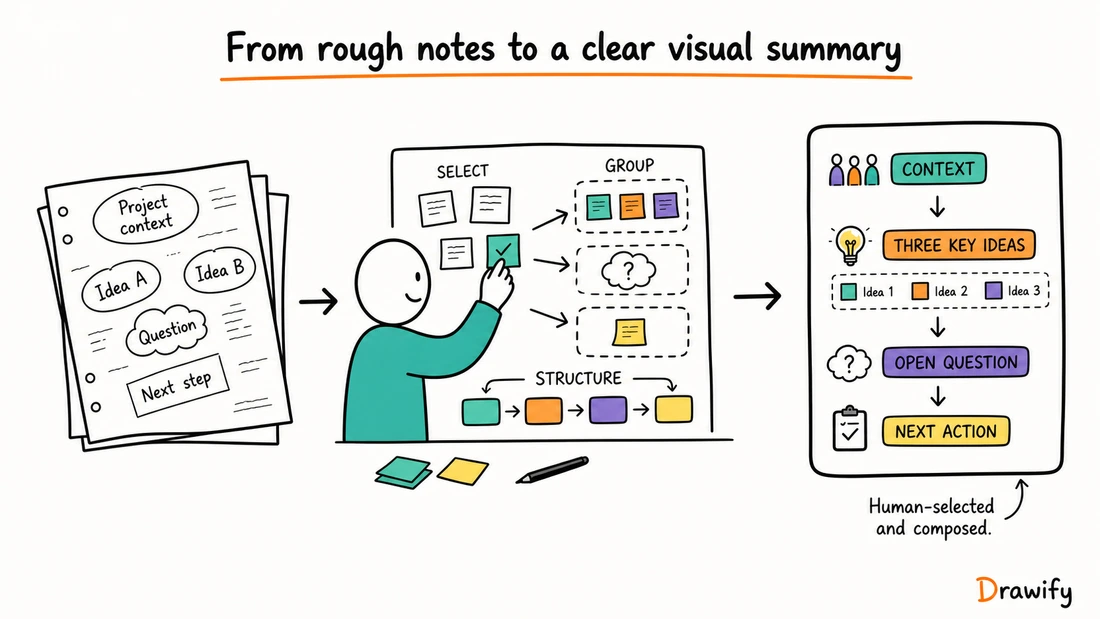
Sketchnoting is a form of visual note-taking that combines words, simple images, symbols, containers, connectors and spatial structure.
Instead of recording every sentence, the note-maker selects the important ideas and shows how they relate.
A sketchnote might include:
- A clear title and context.
- Key ideas in short phrases.
- Visual representations of people, objects, actions or concepts.
- Containers that group related material.
- Arrows or lines showing sequence and relationships.
- Emphasis for important questions, tensions or decisions.
- A visible reading order.
The result is an interpretation of the source, not a verbatim record.
It should be reviewed against the original material before being treated as an accurate summary.
How Drawify relates to sketchnoting
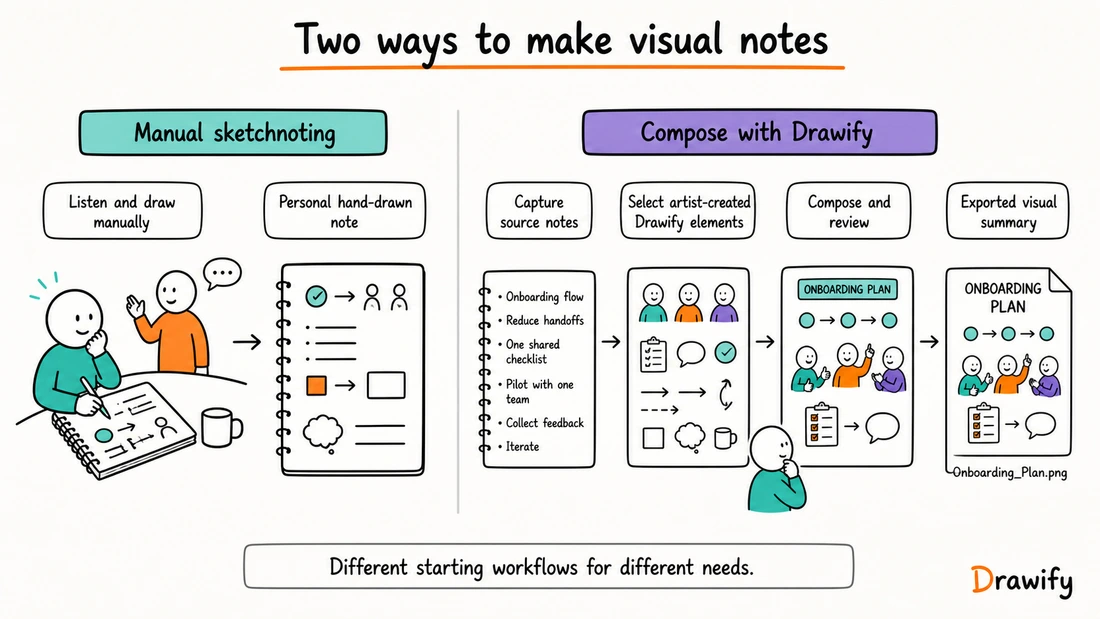
Traditional sketchnoting often involves drawing and writing by hand while listening.
Drawify offers a different route: compose a sketchnote-style visual from ready-made, artist-created illustrations, text and templates.
Drawify can be useful when:
- You want a hand-drawn visual language but do not want to draw every element.
- You want to refine rough visual notes after the event.
- You already have written notes and want to turn them into a visual summary.
- You need a polished visual that can be used in a presentation or document.
- You want to combine known visual elements into a deliberate story.
Drawify does not replace the judgment involved in sketchnoting.
It does not determine which ideas matter, whether an interpretation is fair or what action should follow.
A composition tool, not an automatic note-taker
Drawify's documented workflow is based on finding illustrations or templates, arranging elements, adding text, customizing supported colors and exporting the result.
It should not be described as software that automatically:
- Listens to a live session.
- Records audio or video.
- Produces a transcript.
- Converts handwriting into editable text.
- Detects themes or sentiment.
- Summarizes participant contributions.
- Creates an approved meeting record.
Artist-created visuals instead of drawing every element yourself
Drawify's illustration library is created by professional artists and visual storytellers.
You can select visual elements that support the subject, then combine them with your own words and structure.
From source material to a visual summary
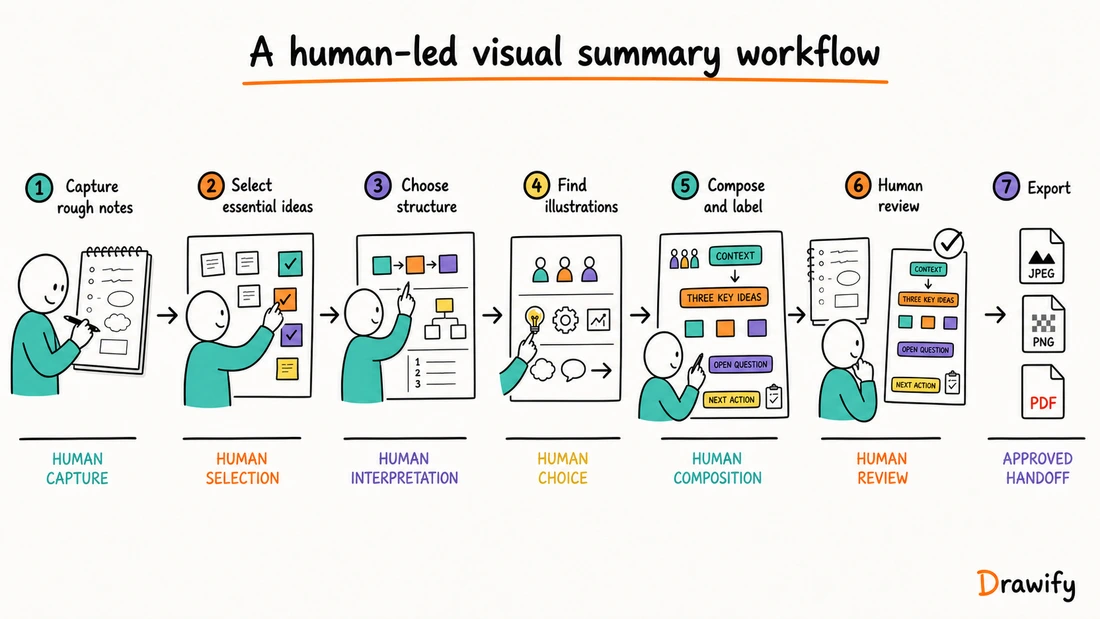
1. Define the purpose
Decide who the summary is for and what it needs to help them do.
A personal learning note, workshop recap and client-facing decision summary require different levels of detail and review.
2. Capture rough notes
During the source event, write down the important ideas, questions, examples and decisions using an appropriate note-taking method.
Do not try to create the polished Drawify composition while accurate listening requires your full attention.
3. Select the essential ideas
Separate:
- Directly observed or stated information.
- Your interpretation.
- Open questions.
- Proposed actions.
- Confirmed decisions.
4. Choose a structure
Useful structures can include:
- Beginning → Development → Conclusion
- Context → Tension → Insight → Proposed direction
- Question → Perspectives → Themes → Decision
- Finding → Implication → Recommendation
- Stage 1 → Stage 2 → Stage 3 → Next step
- Central topic with connected branches
5. Find illustrations and templates
Search or browse for visual elements that represent the people, actions, objects and concepts in the source.
Use a template when an existing layout provides a useful starting structure.
6. Compose and label the story
Arrange the illustrations and concise text into a clear reading path.
Use headings, containers and connectors consistently.
7. Customize with restraint
Drawify supports changing arrangement and adjusting supported colors.
Exact customization options can vary by illustration and plan.
8. Review the summary
Compare the visual with the source notes.
Check names, quotations, status labels, sequence, causality and ownership.
9. Export and use it
Drawify currently documents JPEG, PNG and PDF exports.
Drawify also documents integrations for Google Slides and Miro.
Two practical ways to work
Compose after the session
This is the clearest Drawify fit for many sketchnote-style workflows.
- Capture accurate rough notes during the session.
- Review the source and identify the key message.
- Select relevant Drawify illustrations and a suitable structure.
- Compose the visual summary.
- Verify it against the source or with the appropriate participants.
- Export and share the approved result.
Prepare a visual framework before the session
Create a title, agenda, topic map or empty structure in advance.
During or after the session, add validated words, decisions and relationships using the tools appropriate to the setting.
The prepared framework should guide capture, not predetermine what participants will say.
Relevant sketchnote use cases
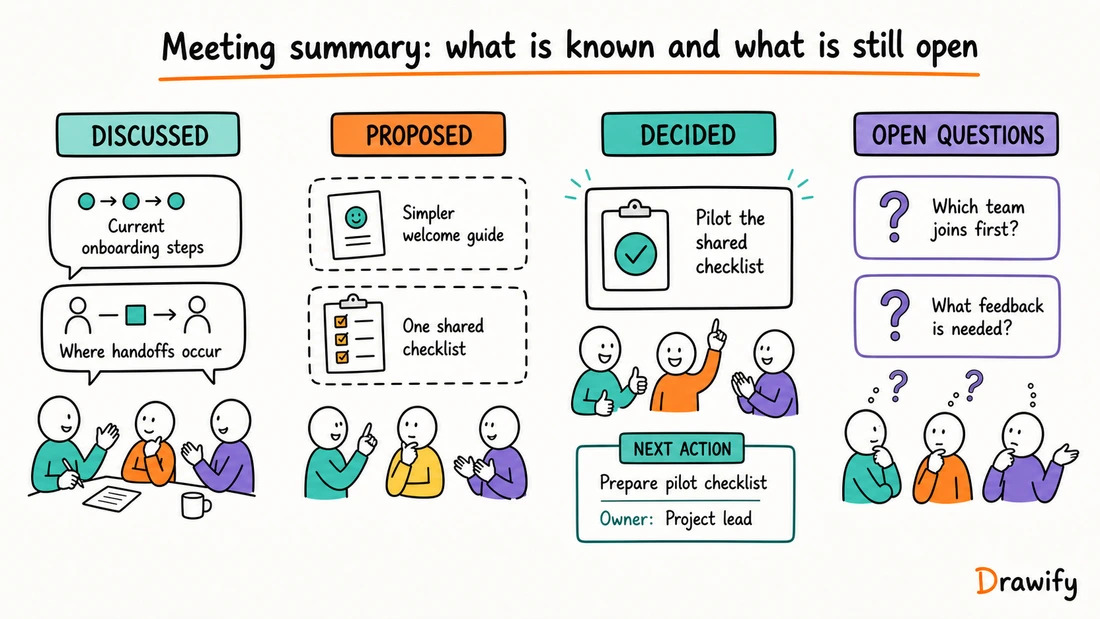
Meeting summaries
Turn an approved set of meeting notes into a visual recap showing context, discussion themes, decisions, owners and open questions.
Keep discussed, proposed and decided visibly separate.
Workshop recaps
Show the workshop journey, participant contributions, themes, decisions and next actions.
Make clear that a facilitator or participant organized and interpreted the material.
Visual storytelling for workshops .
Conference and webinar notes
Create a visual summary of a talk using the speaker's main points, examples and conclusion.
Attribute ideas accurately and do not present a paraphrase as a direct quotation.
Learning and course summaries
Represent the main concept, supporting ideas, examples and remaining questions from a lesson or reading.
Research synthesis
Arrange confirmed findings, supporting evidence, tensions and open questions into a visual overview.
Consulting findings
Create a clear line from evidence to implication and recommendation.
Label each layer so that a recommendation does not appear to be a research finding.
Visual storytelling for consultants .
Strategy communication
Summarize:
Current reality → Strategic tension → Insight → Proposed direction → Next decision
Mark future states as proposed until they have been approved and achieved.
Process explanations
Show stages, roles, handoffs and known bottlenecks without inventing timing, savings or performance figures.
Personal reflection
Organize what you noticed, what surprised you, what remains uncertain and what you want to do next.
Presentation support
Turn a sketchnote-style composition into a visual overview slide or split a longer story into a sequence.
What makes a useful sketchnote-style visual?
One clear purpose
The visual should answer a specific communication need.
Visible hierarchy
The title, main ideas and supporting detail should look different.
An obvious reading path
Use numbering, arrows or a familiar layout to show where to begin.
Concise, accurate text
Short phrases suit a visual summary, but brevity must not remove qualifications such as may, proposed or reported.
Purposeful illustrations
Choose visual elements that represent a role, action, idea or relationship.
Honest separation of evidence and interpretation
Use separate labels or containers for facts, assumptions, interpretations, decisions and actions.
Accessibility beyond the image
Provide meaningful alternative text or a nearby text summary when the visual carries essential information.
Drawify, manual sketchnoting and automatic note tools
These are different approaches, and more than one can be useful in the same workflow.
Choose manual sketchnoting when
- Drawing while listening is part of your thinking process.
- You want the immediacy of pen or stylus marks.
- A rough personal visual record is the desired output.
Choose Drawify when
- You want artist-created hand-drawn visual elements without drawing each one.
- You want to compose or refine a visual summary after capture.
- You need reusable layout, text and export options.
- You want a visual that can be placed in other communication material.
Choose a transcription or note-capture tool when
- You need a searchable record of spoken or written content.
- Verbatim capture is more important than visual composition.
- The tool's consent, privacy and security model fits the context.
Drawify should not be represented as a substitute for a transcript, recording or formally approved record.
What Drawify should not be claimed to do
This page does not claim that Drawify:
- Automatically listens to or records a session.
- Transcribes speech.
- Recognizes handwriting automatically.
- Automatically selects the important ideas.
- Produces an approved meeting summary automatically.
- Detects themes, sentiment or agreement automatically.
- Provides live graphic recording by itself.
- Automatically synchronizes a Drawify composition with third-party documents.
- Guarantees comprehension, memory, participation or learning outcomes.
Frequently asked questions
Is Drawify sketchnote software?
Drawify is a visual-storytelling platform that can be used to create sketchnote-style visual summaries. It provides artist-created illustrations, templates, text and composition tools rather than requiring users to draw every element themselves.
Do I need to know how to draw?
No. You can select and arrange ready-made illustrations created by professional artists and visual storytellers. You still decide which ideas matter and how the finished visual should communicate them.
Does Drawify automatically take notes during a meeting or lecture?
No documented Drawify capability should be described that way. Capture the source material yourself or through an approved note or transcription method, then use Drawify to compose a visual summary.
Can Drawify record or transcribe audio?
Do not claim audio recording or transcription as a Drawify feature. If a separate service is used, obtain any required consent and review its output before including it in a visual.
Does Drawify turn handwritten notes into a sketchnote automatically?
Drawify should not be described as a handwriting-recognition or automatic note-conversion tool. Handwritten notes can be used as source material and the important points can then be composed manually in Drawify.
Can I use Drawify during a live event?
You can prepare visual material in advance or compose using Drawify when the setting and workflow allow it. Drawify does not automatically follow the event, and live composition should not interfere with accurate listening or facilitation.
Are Drawify illustrations created by real artists?
Yes. Drawify states that its illustration library is created by professional artists and visual storytellers. Drawify also documents AI-assisted capabilities, so the whole platform should not be described as AI-free.
Can I customize the visual style?
You can combine elements, change their arrangement and adjust supported colors. Exact customization options can vary by illustration and plan.
Can I add my own images?
Drawify supports uploaded illustrations where that feature is available. Check current plan access and make sure you have permission to use the uploaded material.
Which file formats can I export?
Drawify currently documents JPEG, PNG and PDF exports. Check current plan details for the exact options and conditions available to you.
Can I use the finished visual in Google Slides or Miro?
Drawify documents integrations for Google Slides and Miro. A more complex visual created in the main Drawify editor can also be exported and manually added to a destination that supports the file. Do not assume automatic synchronization.
Can a Drawify visual replace formal meeting minutes or a transcript?
Not by default. A visual summary is selective and interpretive. It becomes an approved record only if the responsible organization reviews and formally accepts it for that purpose.
Does sketchnoting guarantee better understanding or memory?
No. A well-structured visual may support communication, but outcomes depend on the content, audience, context and use.
Turn your notes into a visual story
Choose the ideas that matter, find artist-created illustrations that support them and compose a visual summary with a clear reading path.
Get visualisation tips every week
Subscribe to the Drawify Newsletter, and feed your creativity with visualisation tips and techniques, as well as the latest Drawify workshops, news and resources.