Whether you've got stories to tell or art to create, there's a place for you here.

Freelance Graphic Designers
Illustrating Design Processes for Clients
-
SDSwarnali Das- Co-founder, Chief Product Officer, Drawify
-
Jan 07, 2026 5 min read
Here's something most designers know too well: creating beautiful work is one thing, but explaining how you get there. That's a whole different challenge.
You've probably been there—sitting across from a client, watching their eyes glaze over as you walk through your process deck. The jargon flies, the slides pile up, and somehow, the clarity you're aiming for just doesn't land.
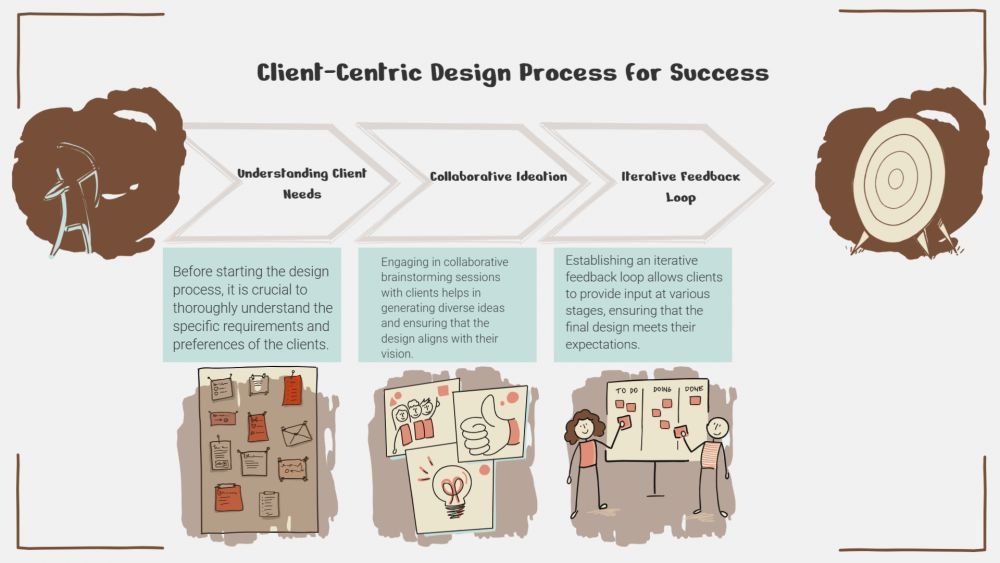
This is where Drawify changes the game. Instead of drowning clients in documentation, you can show them your design journey through simple, hand-drawn visuals that actually make sense.
Why Your Clients Feel Lost (And It's Not Their Fault):
Let's be honest: most clients aren't designers. They don't live and breathe wireframes or speak fluent "design system." When you explain your process through walls of text or technical presentations, the important stuff gets buried.
Here's what typically goes sideways:
Clients expect one timeline, you're working with another. The feedback and revision process feels like a mystery. They can't picture how a rough sketch becomes a polished design. They're not sure when (or how) they should jump in and contribute.
The solution? Show, don't tell. Visual storytelling turns those abstract concepts into something real.

How Drawify Makes Everything Easier:
Drawify helps you create process diagrams that feel approachable—not intimidating. The hand-drawn style keeps things friendly while the structure stays sharp and professional.
Here's what becomes possible:
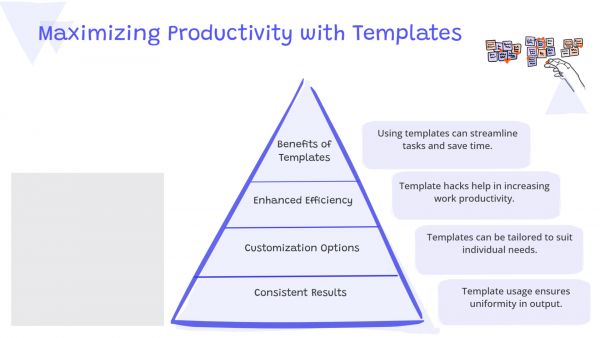
You can break down your entire workflow into clear, visual steps. Show the natural progression from "let's talk" to "here's your final design." Point out exactly where clients need to weigh in or make decisions. Build templates you can customize and reuse across projects.
Instead of explaining the same process over and over, you just show it once—clearly.
The Design Phases That Become Beautifully Clear:
- Discovery & Research: Turn client onboarding, research, and goal-setting into a visual map. Clients can actually see how their input becomes the blueprint for everything that follows.
- Ideation & Concept Development: Use flow diagrams to walk through brainstorming and concept selection. This reassures clients that you're exploring possibilities thoughtfully, not just going with the first idea.
- Wireframing & Prototyping: Illustrated flows help you explain structure and user journeys without throwing fifty technical screens at them.
- Design Iterations & Feedback: Clearly map out revision cycles and approval points. Suddenly, that back-and-forth that used to cause confusion becomes a straightforward path.
- Final Delivery & Handoff: Show clients exactly what they're getting at the finish line—from assets to documentation to ongoing support.
What This Does for Your Client Relationships:
- Builds Real Confidence: When clients can see the full journey ahead, they stop worrying and start trusting. They feel like partners, not passengers.
- Keeps Projects on Track: Clear visuals set expectations from day one, which means fewer "just one more thing" moments that throw everything off course.
- Gets You to Yes Faster: When people understand quickly, they decide quickly. Visual clarity speeds up feedback and approvals naturally.
- Raises Your Game: Illustrated process diagrams show you're thinking strategically about the work—not just executing tasks.
A Few Tips to Keep It Working:
Keep your diagrams focused on one step at a time. Use the same visual language throughout each phase. Make it obvious where clients need to be involved. Build templates so you're not starting from scratch every time. Tweak the details to reflect each client's unique situation.
Drawify makes this balance between simplicity and clarity surprisingly easy to maintain.
Why Designers Love Drawify:
Unlike generic diagramming tools, Drawify is built specifically for visual storytelling. The interface is intuitive, and the illustration style helps you explain not just what you do, but the thinking behind it.
Whether you're flying solo as a freelancer, running an agency, or part of a product team, Drawify turns your process into a story that clients can actually follow.
Illustrating your design process isn't a nice-to-have anymore—it's how you set yourself apart. Clear visuals eliminate confusion, strengthen collaboration, and lead to better work for everyone involved.
With Drawify, you transform your workflow into something clients don't just understand—they appreciate. And when clients can see how you work, they'll trust where you're taking them.
Post This Article to Your Socials
Popular Topics
- Events
- Workshops
- Visual Storytelling
- How to video
- Communities
- Sketchnoting
- Templates
- UX Designers
- Agile Professionals
- Product Managers
- Freelance Graphic Designers
- Creative Tech Enthusiasts
- Online Course Creators
- Social Media Content Creator
- Creative Agency Owners
- Marketing Professionals
- EdTech Professionals
- Scrum Masters
Similar Articles
Come, Be Part of Something Special
-
Got ideas that need visual superpowers?
Jump in and start creating presentations and communications that people actually remember.
Sign In -
Are you an artist ready to grow?
Join our Drawifier family and focus on what you love most - creating art that matters.
Become a Drawifier
Get visualisation tips every week
Subscribe to the Drawify Newsletter, and feed your creativity with visualisation tips and techniques, as well as the latest Drawify workshops, news and resources.